


Motions not animating right
BMM_Archive · July 15, 2026

Original Source
- Original title: Motions not animating right
- Original author: Mando Jetii
- Original date: December 14, 2016
- Source thread: https://forums.rpgmakerweb.com/threads/motions-not-animating-right.72285/
- Source forum path: Game Development Engines > RPG Maker Javascript Plugins > Javascript/Plugin Support
Summary
I am using a number of Yanfly plugins. The relevant ones that I'm using are Battle Core; Action Sequence Packs 1, 2, & 3; and Animated Side-view Battlers. I don't think Animated SV Battlers is affecting it, but it might be. I'm getting this odd error while using action sequences: I set the user to use the "swing" motion while using a sword skill, but although the weapon appears right, the character performs the "skill" motion instead. I don't know if this has been asked before or not, and it...


Archived First Post
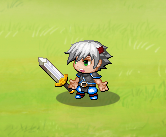
I'm getting this odd error while using action sequences: I set the user to use the "swing" motion while using a sword skill, but although the weapon appears right, the character performs the "skill" motion instead. I don't know if this has been asked before or not, and it is a somewhat minor issue as it took me a while to even notice it, but it is still a problem because if a player notices it, it will make the game look unprofessional.
Here are the note tags of one of the skills that I've noticed the problem on:
<Target Action>
move user: target, front base, 4
face user: forward
motion swing: user
perform action
motion wait: user
action animation: target
wait for animation
action effect: target
death break
</Target Action>
<follow action>
perform finish
</follow action>
To recap the issue, the sword is appearing as it should but the SV actor sprite is using the "skill" motion instead of the "swing" motion, causing the sword to float next to the actor's hand instead of being gripped in it.
Protected download
Downloads / Referenced Files
Log in, then follow the RPG Maker Developers Group to see these download links.
Log in to downloadReferenced Images / Attachments
Creator Claims / Removal
If you are the original creator and want this listing reassigned, edited, or removed, join BMMPlay and contact the moderators with proof that matches the original RPG Maker Web profile, linked GitHub, itch.io page, or another public creator identity.
Replies (0)
No replies yet.
Topic Summary
Loading summary...
