

MVLGP - Face Sprite
BMM_Archive · July 15, 2026

Original Source
- Original title: LGP - Face Sprite
- Original author: Azel
- Original date: July 14, 2018
- Source thread: https://forums.rpgmakerweb.com/threads/lgp-face-sprite.97699/
- Source forum path: Game Development Engines > RPG Maker Javascript Plugins > JS Plugin Releases (RMMV)
Summary
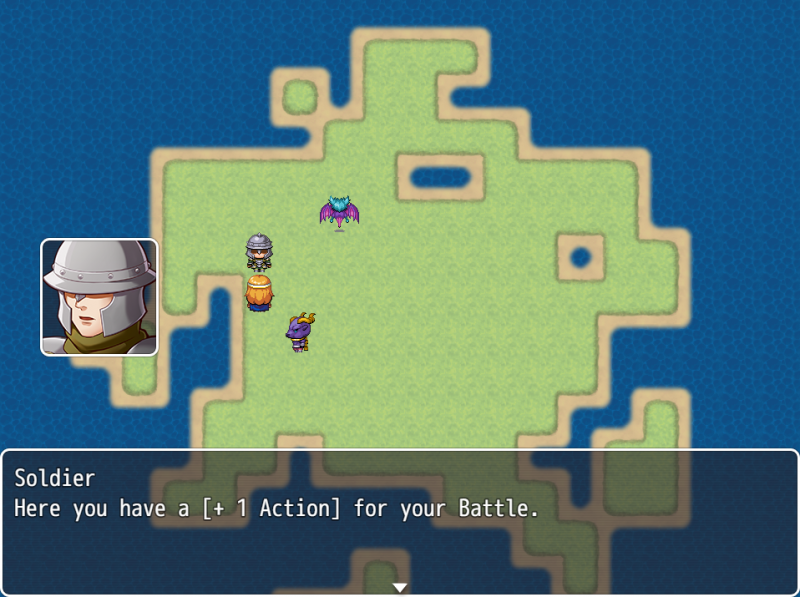
LGP_FaceSprite v3.3 Azel Introduction RPG Maker MV allows you to set a face image in the message box. In the Pokemon Mystery Dungeon series the face is a separate Sprite in a Window. This Plugin does that now.
Archived First Post
Azel
Introduction
RPG Maker MV allows you to set a face image in the message box. In the Pokemon Mystery Dungeon series the face is a separate Sprite in a Window. This Plugin does that now.
Features
Screenshot
How to Use
This plugin is standalone. You can put this anywhere in your plugin list. It will take the image inside the message window you selected and displays it as a separate window all automatically.
Plugin Commands:
numpad. The position of the number on the numpad equals the position of the
face sprite on the screen. Default is always [1] Bottom Left.
[7] [8] [9]
[4] [5] [6]
[1] [2] [3]
Script
GitHub
Compatibility
Currently works with everything Yanfly offers with his message plugins. This Plugin mainly overwrites the drawFace function inside the message window. So it isn't displayed anymore.
Conditions
This Plugin if free for all. Use it as you see it fit.
Change Log
- Faceimage apears ontop of the window.
infront of the Window Background
- Added Param: Set the Message Window Margin.
stays at it is.
- Everything esle works pretty much automatic.
- Added "Position List" Parameter in the Plugin section.
- Reworked FSPos functions. They work diffrently but the use of it
hasn't changed.
- Calling an event now sets the FSPos to the default value before the interpreter takes action.
This solves a problem I had, when I reset the FSPos to the default at the end of the
MessageWindow logic.
- Added scriptcall $gameSystem.setFSPosition(index); to manually set the positon based on index.
- Added scriptcall $gameSystem.setFSPosition(x, y); to amnually set the position based on coords.
Credit and Thanks
LGP Azel
Notes
If there are any compatibility issues, critics or improvement wishes please let me know.
Features Mentioned
- Having face sprites.Set face sprite positions.Face sprite uses Window borders.Face sprite takes the face from the message picture.Change Face Sprite position via Scriptcalls.
Downloads / Referenced Files
RPG Maker Web attachments are mirrored locally when available. Other external links remain hosted by their original creator or third-party service.
- Source: GitHub
License / Terms Note
Credit and Thanks LGP Azel Notes If there are any compatibility issues, critics or improvement wishes please let me know.
Referenced Images / Attachments
Creator Claims / Removal
If you are the original creator and want this listing reassigned, edited, or removed, join BMMPlay and contact the moderators with proof that matches the original RPG Maker Web profile, linked GitHub, itch.io page, or another public creator identity.
Replies (0)
No replies yet.
Topic Summary
Loading summary...