Preserved forum archive. This topic stores the original first post and locally mirrored RPG Maker Web attachments when available. It is posted by the BMMPlay archive account, not by the original creator.
Source forum path: Game Development Engines > Legacy Engine Support > RPG Maker MV Support
Summary
Not sure if this is the right place to post, whoops ^^ So I have a custom tileset that I'd like to use in my game. I've made sure that I'm uploading the png to the right place and such. The tileset shows up fine in the editor, but when I run the game, that isn't the case. I can walk around, but the map is entirely black, even though I've placed custom tiles there. The wall boundaries seem to work fine, however. Also, I know the background for the...
Archived First Post
Not sure if this is the right place to post, whoops ^^
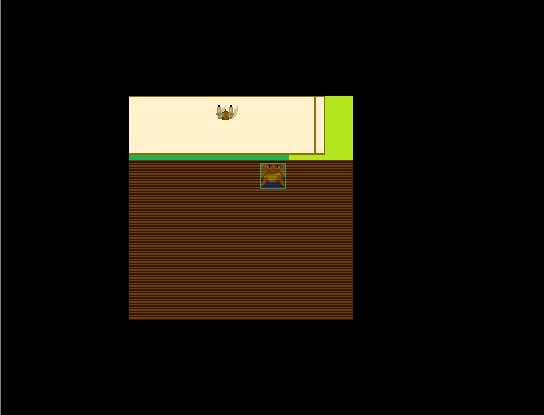
So I have a custom tileset that I'd like to use in my game. I've made sure that I'm uploading the png to the right place and such. The tileset shows up fine in the editor, but when I run the game, that isn't the case. I can walk around, but the map is entirely black, even though I've placed custom tiles there. The wall boundaries seem to work fine, however.
Also, I know the background for the tiles have to be transparent, but I'm lazy and this is just a test.
Screen Shot 2018-03-11 at 7.39.48 PM.pngScreen Shot 2018-03-11 at 7.40.12 PM.pngScreen Shot 2018-03-11 at 7.40.22 PM.pngScreen Shot 2018-03-11 at 7.40.34 PM.png
Creator Claims / Removal
If you are the original creator and want this listing reassigned, edited, or removed, join BMMPlay and contact the moderators with proof that matches the original RPG Maker Web profile, linked GitHub, itch.io page, or another public creator identity.







 Keychron K2 QMK Wireless Mechanical Gaming Keyboard
Compact wireless mechanical keyboard for office work, gaming, and desk upgrades.
View on Amazon
Keychron K2 QMK Wireless Mechanical Gaming Keyboard
Compact wireless mechanical keyboard for office work, gaming, and desk upgrades.
View on Amazon
