Preserved forum archive. This topic stores the original first post and locally mirrored RPG Maker Web attachments when available. It is posted by the BMMPlay archive account, not by the original creator.
Original Source
- Original title: YED_SideviewBattler Enemies
- Original author: LadyBaskerville
- Original date: October 31, 2016
- Source thread: https://forums.rpgmakerweb.com/threads/yed_sideviewbattler-enemies.70398/
- Source forum path: Game Development Engines > RPG Maker Javascript Plugins > Javascript/Plugin Support
Summary
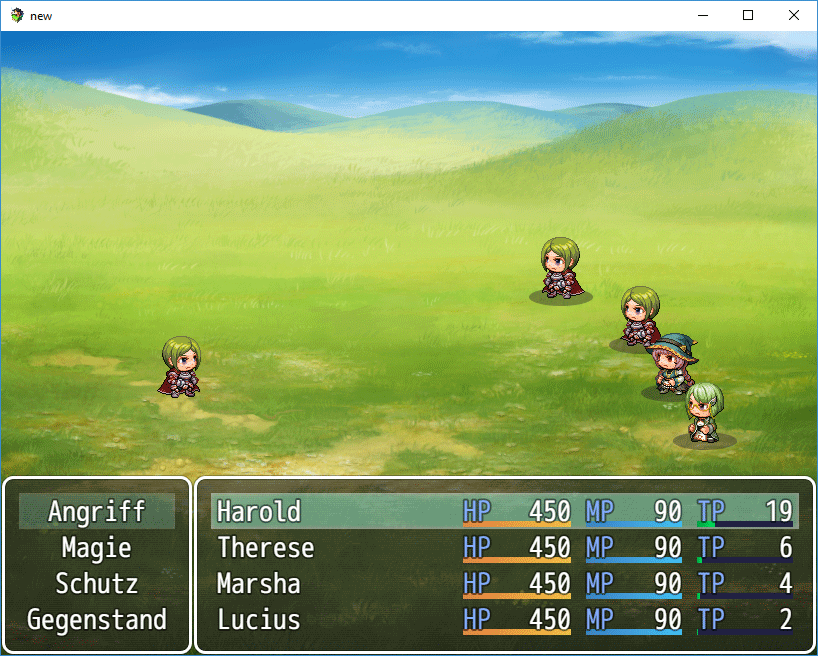
I'm encountering a problem when using the YED_SideviewBattler plugin to animate enemies: The frames appear next to each other instead of animating properly. It looks more or less like this: { "lightbox_close": "Close",
Archived First Post
I'm encountering a problem when using the YED_SideviewBattler plugin to animate enemies:
The frames appear next to each other instead of animating properly. It looks more or less like this:
Protected download
The actor at the very top is animated with the same plugin and the exact same notetag. Everything works as expected there.
This is my notetag for both the actor and the enemy:
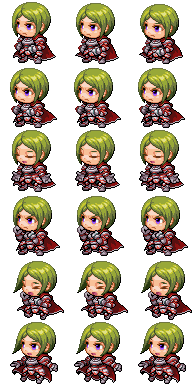
simpleSV is this graphic (made for testing purposes, I would normally use more frames with this plugin):
Protected download
It's placed in both the sv_actors and the sv_enemies folder.
I'm using the following plugins with default configurations in this order:
YEP_BattleEngineCore (v1.40)
YEP_X_AnimatedSVEnemies (v.1.15)
YED_SideviewBattler (v.1.1.0)
Engine and project are updated to 1.3.3 and the error occurs in a fresh project as well.
Can someone tell me what I did wrong?
EDIT: When setting the Sprite Width and Sprite Height parameters of YEP_X_AnimatedSVEnemies manually to 64, like it says in the Help file for YED_SideviewBattler
the first two frames are animated properly, but the third "jumps" to the side like before.
The frames appear next to each other instead of animating properly. It looks more or less like this:
Protected download
The actor at the very top is animated with the same plugin and the exact same notetag. Everything works as expected there.
This is my notetag for both the actor and the enemy:
Code:
<Sideview Battler: simpleSV>
<Sideview Battler Frames: 3>
<Sideview BattlerSpeed: 12>
<Sideview Battler Size: 64, 64>
<Sideview Battler Motion>
Name: walk
Index: 0
Loop
</Sideview Battler Motion>
simpleSV is this graphic (made for testing purposes, I would normally use more frames with this plugin):
Protected download
It's placed in both the sv_actors and the sv_enemies folder.
I'm using the following plugins with default configurations in this order:
YEP_BattleEngineCore (v1.40)
YEP_X_AnimatedSVEnemies (v.1.15)
YED_SideviewBattler (v.1.1.0)
Engine and project are updated to 1.3.3 and the error occurs in a fresh project as well.
Can someone tell me what I did wrong?
EDIT: When setting the Sprite Width and Sprite Height parameters of YEP_X_AnimatedSVEnemies manually to 64, like it says in the Help file for YED_SideviewBattler
5. When using with Yanfly's Animated Sideview Enemies, the sprite width and
height should be set manually instead of 'auto'.
the first two frames are animated properly, but the third "jumps" to the side like before.

Downloads / Referenced Files
Log in to download
Log in, then follow the RPG Maker Developers Group to see these download links.
Log in to downloadReferenced Images / Attachments
Creator Claims / Removal
If you are the original creator and want this listing reassigned, edited, or removed, join BMMPlay and contact the moderators with proof that matches the original RPG Maker Web profile, linked GitHub, itch.io page, or another public creator identity.
Replies (0)
No replies yet.
0
replies
1
view
Topic Summary
Loading summary...