


-Solved- TDD Bind Pictures To Map Issue - Picture Won't Scroll With Map
BMM_Archive · July 15, 2026

Original Source
- Original title: -Solved- TDD Bind Pictures To Map Issue - Picture Won't Scroll With Map
- Original author: meowzers
- Original date: August 19, 2016
- Source thread: https://forums.rpgmakerweb.com/threads/solved-tdd-bind-pictures-to-map-issue-picture-wont-scroll-with-map.67046/
- Source forum path: Game Development Engines > RPG Maker Javascript Plugins > Javascript/Plugin Support
Summary
EDIT: Problem solved. The issue was that the plugin command wasn't correct. "BindPicturesToMap" is what I had, but the actual command is "BindPictureToMap" without the S on the end of Picture. I'm having an issue with TDD's Bind Pictures To Map (version. 1.0.7) plugin. It's changing a picture's layer correctly, but it doesn't seem to be properly binding the picture to the map. What's Happening:


Archived First Post
I'm having an issue with TDD's Bind Pictures To Map (version. 1.0.7) plugin.
It's changing a picture's layer correctly, but it doesn't seem to be properly binding the picture to the map.
What's Happening:
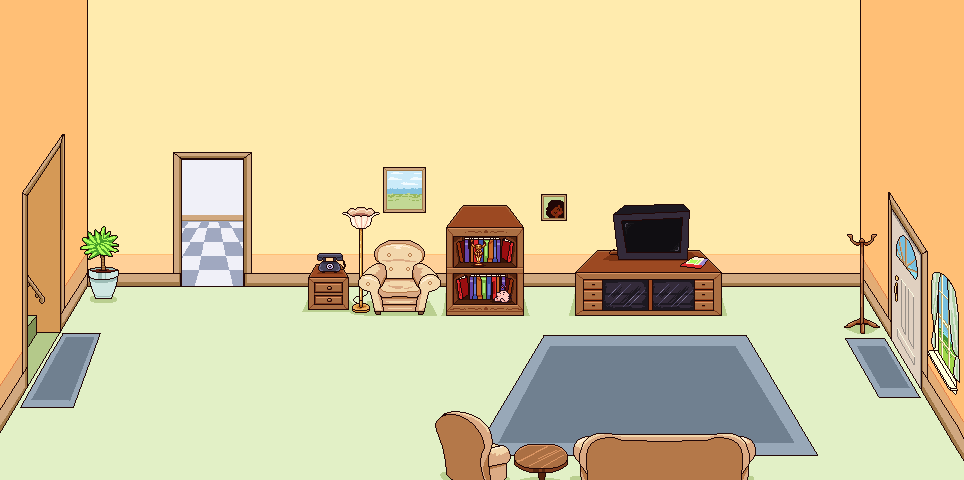
The picture I'm using for the background is a little bigger than the game's "screen" so it's going to scroll a little when the player walks around. (The image is not very big)
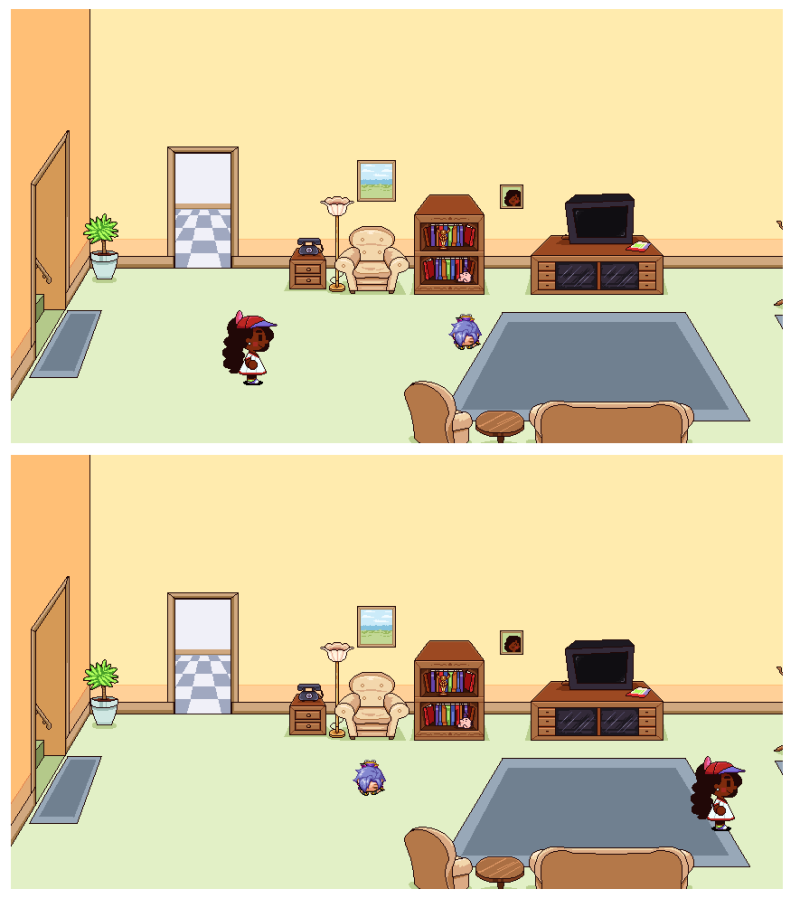
However, when the player moves towards the edge of the screen, the image is stuck in place.
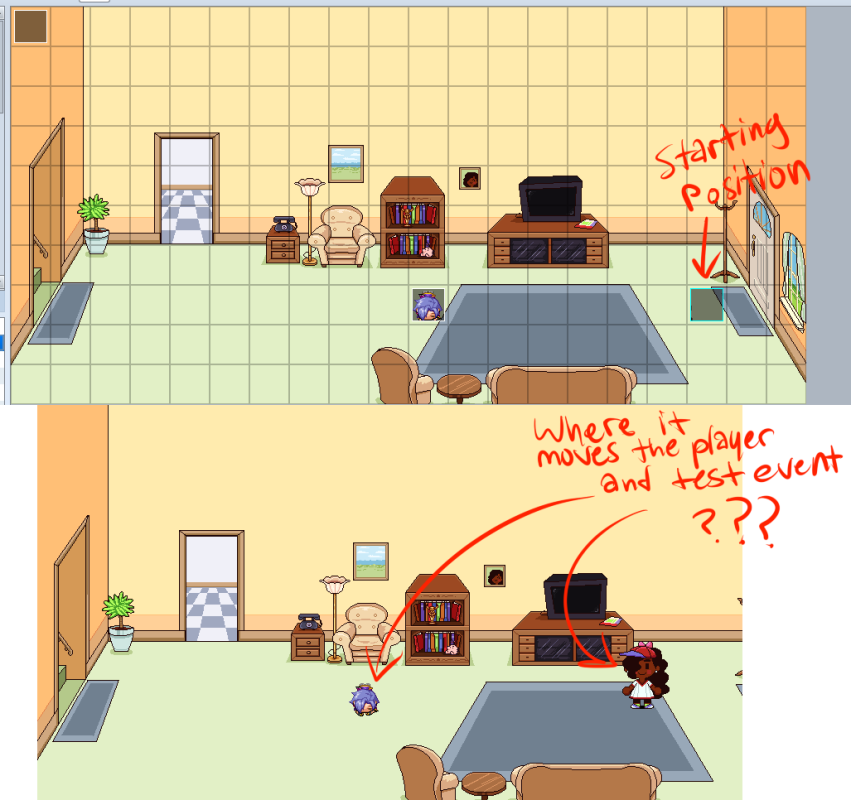
Interestingly, it seems to be stuck on a fixed position (the left side of the screen, if that makes a difference.) For example, if I move the player's starting position to the right side of the screen, when I playtest the game it instantly boots the player back over to the left side of the screen. (In the attached files there's screenshots to show what I mean.)
Some plugin commands aren't working either. I've only found one that doesn't work, but there may be others I haven't found.
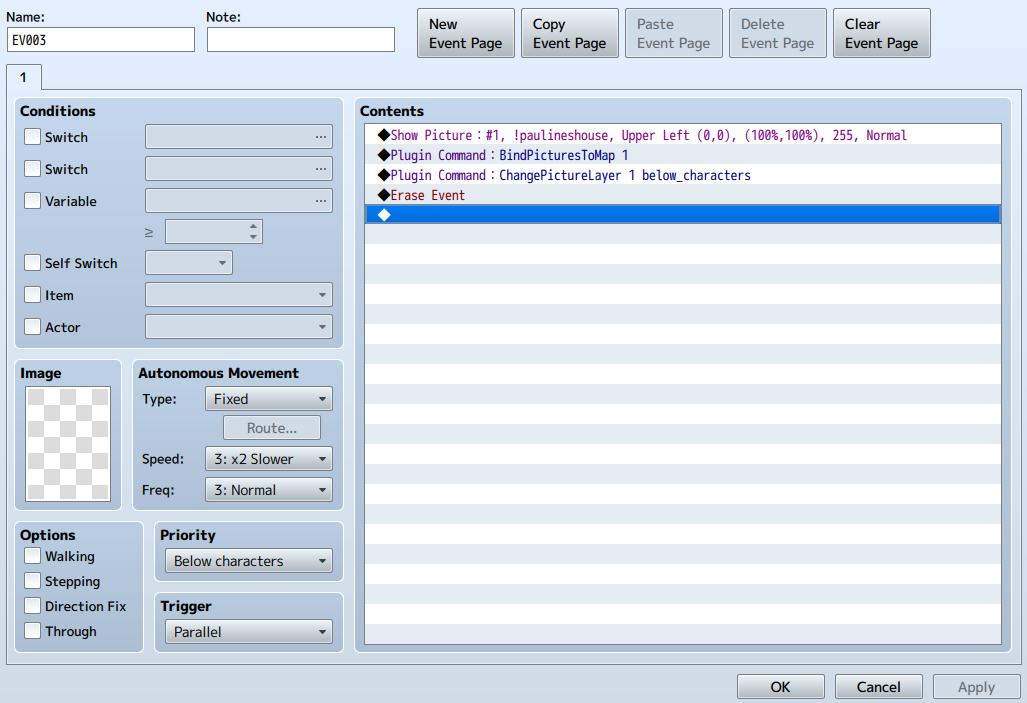
When I try to change a picture's layer with "BindPicturesToMap 1 below_characters" (an example command given by the plugin's writer on this page http://mvplugins.tordamian.com/plugins/bind-pictures-to-map/ ) the layer change doesn't work.
If I change a picture's layer with "ChangePictureLayer 1 below_characters" then the layer change works.
What I've Tried:
Removing all other plugins to see if there might be another plugin that's conflicting - Didn't work, didn't change the plugin's behavior
Adding an ! at the beginning of the picture's file to mimic MV's built in parallax scrolling command (in case it's an issue with mv and not the plugin) - Didn't work, didn't change the plugin's behavior
Checked to make sure the plugin was named properly (as I've had plugins not work in the past if they weren't named exactly what the script writer named it)
In the attached files I've included screenshots to show what's happening in-game, the full image of the picture I'm trying to use as the background, and the event script with plugin commands in case I've done something wrong there.
Is anyone else having an issue like this?
Protected download
Protected download
Protected download
Protected download
Downloads / Referenced Files
Log in, then follow the RPG Maker Developers Group to see these download links.
Log in to downloadReferenced Images / Attachments
Creator Claims / Removal
If you are the original creator and want this listing reassigned, edited, or removed, join BMMPlay and contact the moderators with proof that matches the original RPG Maker Web profile, linked GitHub, itch.io page, or another public creator identity.
Replies (0)
No replies yet.
Topic Summary
Loading summary...
