Is it possible to shift the party gauge bars to the very top and have the icons (with 1, 2 or 3) placed below them? I've tried setting them to appear right at the top, but I believe the icon's need to be placed above the gauges was preventing them from going higher. Script: http://yanfly.moe/2016/02/06/yep-67-party-limit-gauge/ Also, is it possible to shift the battle text (such as what actions or states are doing)? I would like to shift it to the bottom left, meaning the width would be shorter (than the entire width of the...
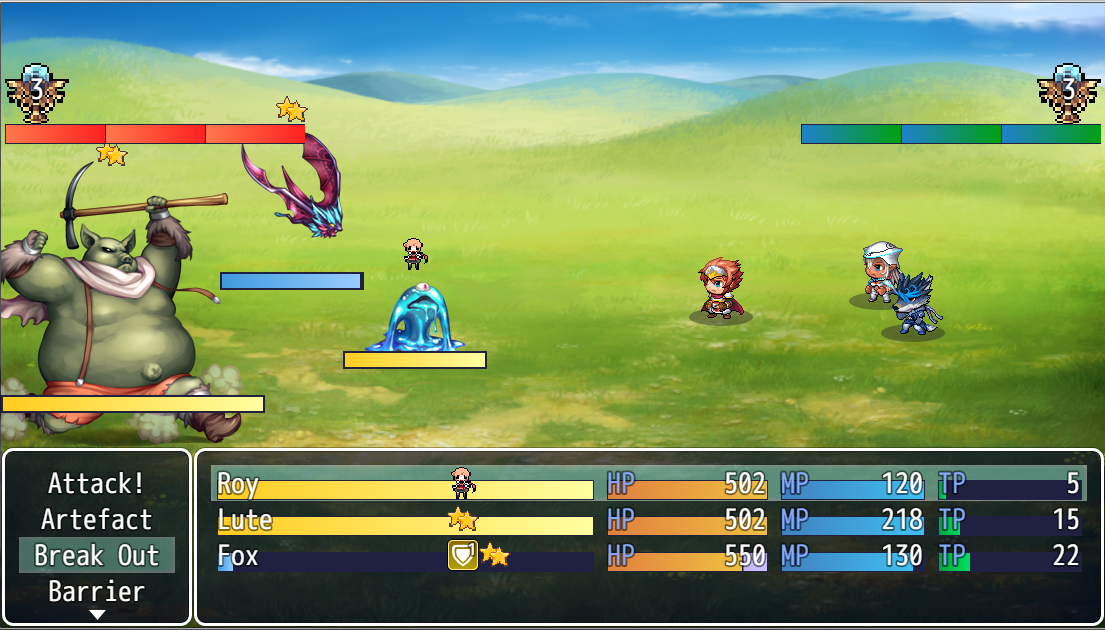
Is it possible to shift the party gauge bars to the very top and have the icons (with 1, 2 or 3) placed below them? I've tried setting them to appear right at the top, but I believe the icon's need to be placed above the gauges was preventing them from going higher.
Script:
http://yanfly.moe/2016/02/06/yep-67-party-limit-gauge/
Also, is it possible to shift the battle text (such as what actions or states are doing)? I would like to shift it to the bottom left, meaning the width would be shorter (than the entire width of the screen). Word wrapping would be appreciated as well (And the other stuff currently on screen would be shifted to the right to accommodate for the new space). Not sure if the battle system matters, but I'm using Yanfly's ATB.
Asking for someone to code this for me might be too much, so it would be nice if I can be guided to which scripts (and hopefully sections) I have to go to and play around with to adjust these stuff.
Protected download



 Playstation DualSense Charging Station
Dock-style charging station for keeping two DualSense controllers ready between sessions.
View on Amazon
Playstation DualSense Charging Station
Dock-style charging station for keeping two DualSense controllers ready between sessions.
View on Amazon