


Events can't go through each other
BMM_Archive · July 15, 2026

Preserved forum archive. This topic stores the original first post and locally mirrored RPG Maker Web attachments when available. It is posted by the BMMPlay archive account, not by the original creator.
Original Source
- Original title: Events can't go through each other
- Original author: sairus323
- Original date: September 14, 2017
- Source thread: https://forums.rpgmakerweb.com/threads/events-cant-go-through-each-other.84002/
- Source forum path: Game Development Engines > Legacy Engine Support > RPG Maker MV Support
Summary
Hi everyone! I'be encountered one problem: I'm creating a level where you must dodge moving events and some of them should move the same/similar/crossing routes, however the events, when they move into each other, are stopped moving... there are screenshots srom the editor and the game: Spoiler: example screenshots {
Archived First Post
Hi everyone! I'be encountered one problem: I'm creating a level where you must dodge moving events and some of them should move the same/similar/crossing routes, however the events, when they move into each other, are stopped moving...
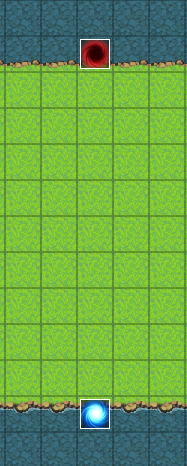
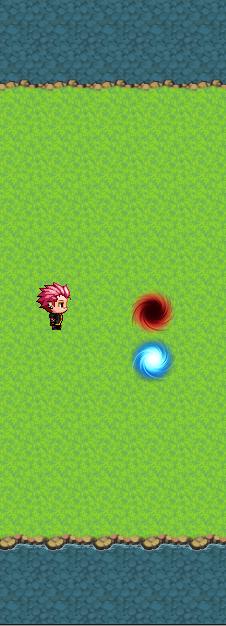
there are screenshots srom the editor and the game:
The red and blue events on the first screenshot are supposed to move up and down. I've set their priority as below player and above player respectively but they're stop moving when they collide as shown on the second screenshot... And when I check the Through box, they're moving as I need them to move but "player touch" activation is not working...
Is there a way to make them work as intended or I should scrap the idea and use the other ways to create an obstacles?
there are screenshots srom the editor and the game:
Protected download Protected download
Is there a way to make them work as intended or I should scrap the idea and use the other ways to create an obstacles?
Downloads / Referenced Files
Log in to download
Log in, then follow the RPG Maker Developers Group to see these download links.
Log in to downloadReferenced Images / Attachments
Creator Claims / Removal
If you are the original creator and want this listing reassigned, edited, or removed, join BMMPlay and contact the moderators with proof that matches the original RPG Maker Web profile, linked GitHub, itch.io page, or another public creator identity.
Replies (0)
No replies yet.
0
replies
5
views
Topic Summary
Loading summary...

