Preserved forum archive. This topic stores the original first post and locally mirrored RPG Maker Web attachments when available. It is posted by the BMMPlay archive account, not by the original creator.
Original Source
Original title: How to use wider portraits on YEP Battle Status Window?
Source forum path: Game Development Engines > RPG Maker Javascript Plugins > Javascript/Plugin Support
Summary
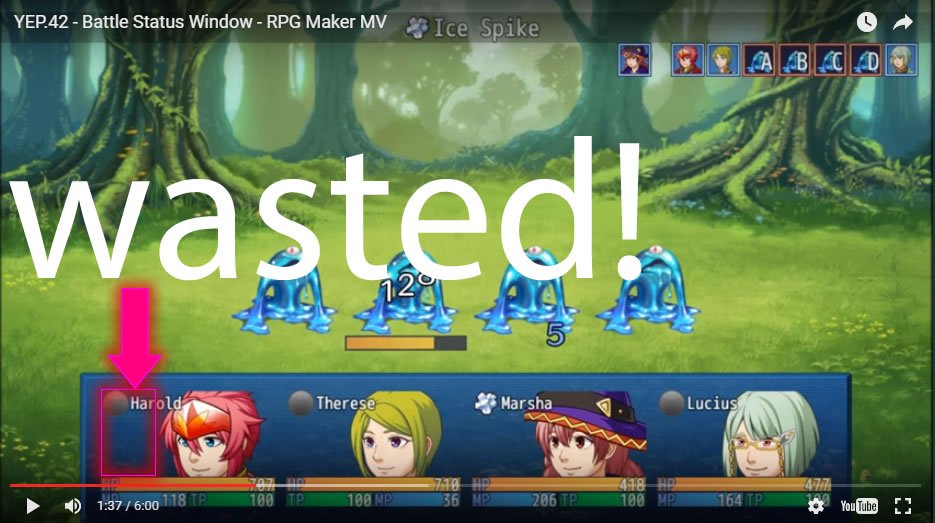
Hello! I'm using Yanfly's Battle Status Window and I would like to make my portraits wider. Use the whole rectangle area avaible instead of the default square portrait. I've managed to do that on VX Ace but I'm clueless on MV. { "lightbox_close": "Close",
Archived First Post
Hello! I'm using Yanfly's Battle Status Window and I would like to make my portraits wider.
Use the whole rectangle area avaible instead of the default square portrait. I've managed to do that on VX Ace but I'm clueless on MV.
Downloads / Referenced Files
RPG Maker Web attachments are mirrored locally when available. Other external links remain hosted by their original creator or third-party service.
Local mirror:23514-ebf61e61f46574986bd26d4df3c1139c.jpg SHA-256: 7536d9ec36b713a86145026bdf9c750ba9139df91ad355697a4d1b01c361b6f6 Original attachment URL: https://forums.rpgmakerweb.com/attachments/untitled-2-jpg.39331/
Referenced Images / Attachments
Untitled-2.jpg
Creator Claims / Removal
If you are the original creator and want this listing reassigned, edited, or removed, join BMMPlay and contact the moderators with proof that matches the original RPG Maker Web profile, linked GitHub, itch.io page, or another public creator identity.