

Battler Position Problem in Ultra-wide Resolution using Yanfly Core
BMM_Archive · July 15, 2026

Original Source
- Original title: Battler Position Problem in Ultra-wide Resolution using Yanfly Core
- Original author: BTez
- Original date: December 31, 2015
- Source thread: https://forums.rpgmakerweb.com/threads/battler-position-problem-in-ultra-wide-resolution-using-yanfly-core.54047/
- Source forum path: Game Development Engines > RPG Maker Javascript Plugins > Javascript/Plugin Support
Summary
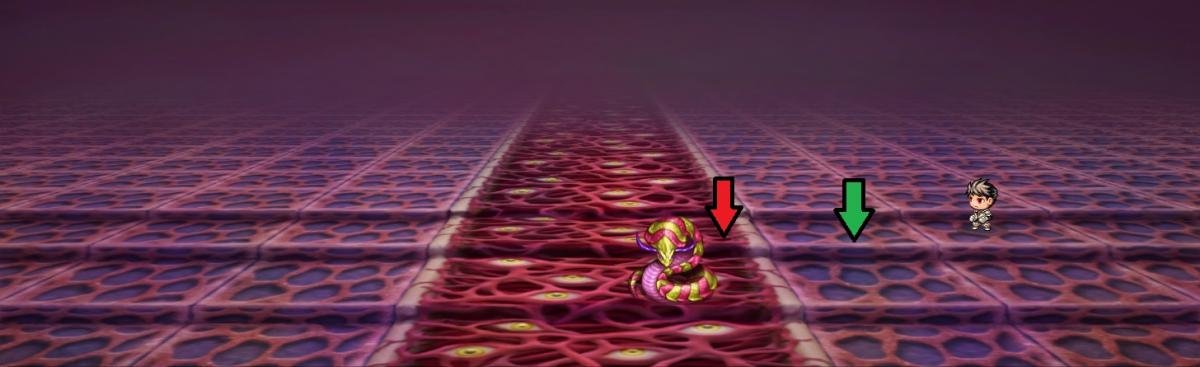
Planning on making my game in the 21:9 ultra-wide format as a huge part of my title is going to be about the monsters and how abundant in size and numbers they can get in combat. I have everything worked out and just about ready to start working on the numbers save this problem. In the attachment you can see the bad guy and the good guy ... but that is as close as I can get the two sprites on screen without moving the PC actor (which I found...
Archived First Post
In the attachment you can see the bad guy and the good guy ... but that is as close as I can get the two sprites on screen without moving the PC actor (which I found the setting to do in the Battle Core but trying to avoid doing). The red arrow points to the side of the sprite, and the green arrow points to where I would like to get the battlers up to at their closest.
Is there a way to do this? I have searched thru the Yanfly's library (which I have every script installed but many turned off... don't ask me...) and have not found a way to get the battler sprites further to the right. I thought I had found the way to adjust Yanfly's Core code to have the math do it for me but to no avail.
Plz - n - thank you.
Downloads / Referenced Files
RPG Maker Web attachments are mirrored locally when available. Other external links remain hosted by their original creator or third-party service.
- Local mirror: 16000-b0086aa2ba5daebefef5702cdb080b2b.jpg
SHA-256:4df0f488c4ba045b8ff5babb904c3a568b2e6ca9943bc3f5f7b1ad8029c10392
Original attachment URL: https://forums.rpgmakerweb.com/attachments/untitled-75-jpg.27993/
Referenced Images / Attachments
Creator Claims / Removal
If you are the original creator and want this listing reassigned, edited, or removed, join BMMPlay and contact the moderators with proof that matches the original RPG Maker Web profile, linked GitHub, itch.io page, or another public creator identity.
Replies (0)
No replies yet.
Topic Summary
Loading summary...