

Choose an option as Popup
BMM_Archive · July 15, 2026

Original Source
- Original title: Choose an option as Popup
- Original author: jet_black
- Original date: November 25, 2015
- Source thread: https://forums.rpgmakerweb.com/threads/choose-an-option-as-popup.51473/
- Source forum path: Game Development Engines > RPG Maker Javascript Plugins > Javascript/Plugin Support
Summary
Hello guys, I am working on an UI for the game me and my team are developing and I have a question. I know how to use the AI for all window-screens (Still waiting for the MV-Luna Engine Tutorial for the In-Game Menu), but I would like to have a popup for options the player can choose from. It would also be awesome to not have the message windows fixed at the bottom and where you have to close them via ESC, but to have them as popups and you...
Archived First Post
I am working on an UI for the game me and my team are developing and I have a question.
I know how to use the AI for all window-screens (Still waiting for the MV-Luna Engine Tutorial for the In-Game Menu), but I would like to have a popup for options the player can choose from.
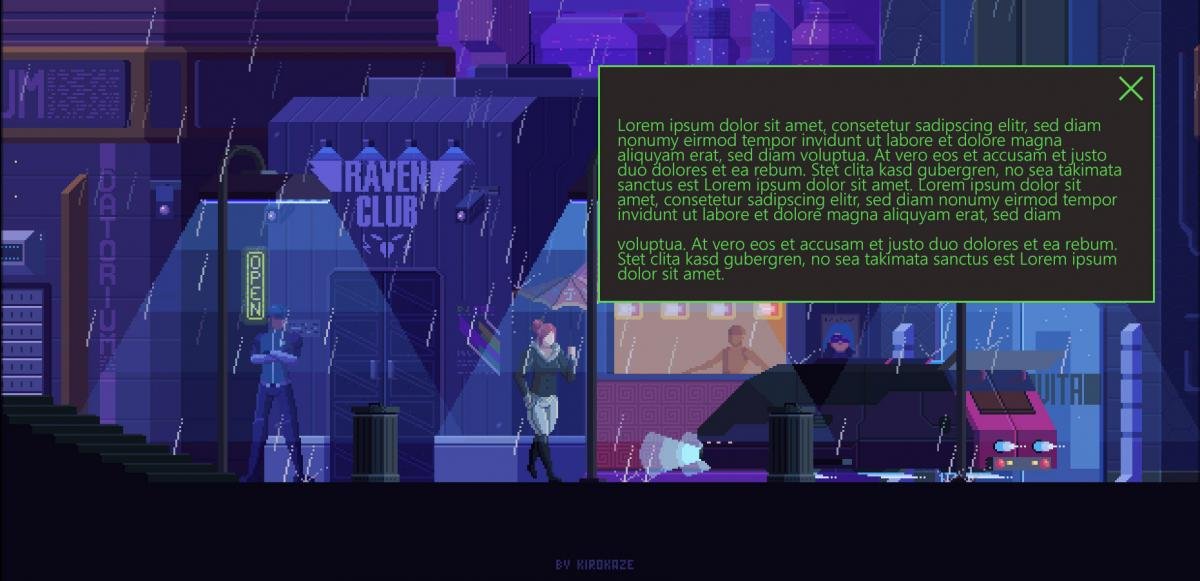
It would also be awesome to not have the message windows fixed at the bottom and where you have to close them via ESC, but to have them as popups and you can also click the X on the top right corner to close them (besides the still available ESC option or clicking outside of the popup).
So how can I create the option-popups and/or how can I display the messages the way I described? I did a mockup as an example (Pixel Artwork is from kirokaze) in the attachment
Downloads / Referenced Files
RPG Maker Web attachments are mirrored locally when available. Other external links remain hosted by their original creator or third-party service.
- Local mirror: 15001-648b169e9568d22d5730215de5f7f353.jpg
SHA-256:d881a08bce2335a5d0a0643d3cdfcdfff4a423caef66e7be34d2fff5f8e4972d
Original attachment URL: https://forums.rpgmakerweb.com/attachments/rainy_day_by_kirokaze-example-jpg.26580/
Referenced Images / Attachments
Creator Claims / Removal
If you are the original creator and want this listing reassigned, edited, or removed, join BMMPlay and contact the moderators with proof that matches the original RPG Maker Web profile, linked GitHub, itch.io page, or another public creator identity.
Replies (0)
No replies yet.
Topic Summary
Loading summary...