


Save Objects Position via Variables?
BMM_Archive · July 15, 2026

Preserved forum archive. This topic stores the original first post and locally mirrored RPG Maker Web attachments when available. It is posted by the BMMPlay archive account, not by the original creator.
Original Source
- Original title: Save Objects Position via Variables?
- Original author: Otomatik_Osman
- Original date: January 19, 2017
- Source thread: https://forums.rpgmakerweb.com/threads/save-objects-position-via-variables.73849/
- Source forum path: Game Development Engines > Legacy Engine Support > RPG Maker MV Support
Summary
Hello dear Friends, finally, after a couple of weeks I could understand working with variables.. but not completely. XD Let me explain my problem. I want this feature:
Archived First Post
Hello dear Friends,
finally, after a couple of weeks I could understand working with variables.. but not completely. XD
Let me explain my problem.
I want this feature:
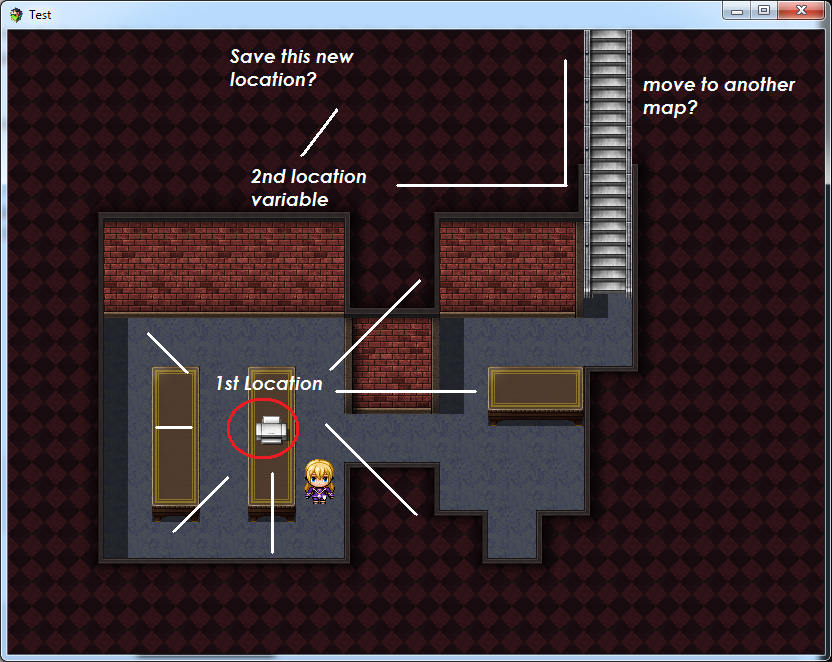
The player can pick up an Event (an Item like a Book). If he picks the Item, the item is in the inventory, and disappeared on the Map. Now he can place the book on the other table.
Everything is fine. The Item is gone in inventory, the switch is active again, you can see the book on the map and pickup again if you want.
Now the problem:
If you leave the room, and come back, the Book is on his old position again.
So my questions:
1. Is there any possibiliy the books new position? It has to be variable, so the Player can choose which object he wants to place where in this room.
2. If I copy the Event, I can move more objects... but for every object copied, I need the double amount of switches and common events... would this be an performance issue?
3. If we can save the position... now the harder question: Is it possible to transfer the Event from one Map to another without making 10000 Events? (Lets Say there are 10 Objects to move to another room)
I hope you can help me a little bit. =)
Thanks everyone!
Protected download
finally, after a couple of weeks I could understand working with variables.. but not completely. XD
Let me explain my problem.
I want this feature:
The player can pick up an Event (an Item like a Book). If he picks the Item, the item is in the inventory, and disappeared on the Map. Now he can place the book on the other table.
Everything is fine. The Item is gone in inventory, the switch is active again, you can see the book on the map and pickup again if you want.
Now the problem:
If you leave the room, and come back, the Book is on his old position again.
So my questions:
1. Is there any possibiliy the books new position? It has to be variable, so the Player can choose which object he wants to place where in this room.
2. If I copy the Event, I can move more objects... but for every object copied, I need the double amount of switches and common events... would this be an performance issue?
3. If we can save the position... now the harder question: Is it possible to transfer the Event from one Map to another without making 10000 Events? (Lets Say there are 10 Objects to move to another room)
I hope you can help me a little bit. =)
Thanks everyone!
Protected download
Downloads / Referenced Files
Log in to download
Log in, then follow the RPG Maker Developers Group to see these download links.
Log in to downloadReferenced Images / Attachments
Creator Claims / Removal
If you are the original creator and want this listing reassigned, edited, or removed, join BMMPlay and contact the moderators with proof that matches the original RPG Maker Web profile, linked GitHub, itch.io page, or another public creator identity.


Replies (0)
No replies yet.
0
replies
5
views
Topic Summary
Loading summary...
