



public

Rpg Maker Developers Group

Simple enough for a child, powerful enough for a developer

2 Followers

Black border at the edge of the screen

BMM Archive · July 15, 2026

Preserved forum archive. This topic stores the original first post and locally mirrored RPG Maker Web attachments when available. It is posted by the BMMPlay archive account, not by the original creator.

Original Source

  • Original title: Black border at the edge of the screen
  • Original author: nanao3
  • Original date: July 13, 2023
  • Source thread: https://forums.rpgmakerweb.com/threads/black-border-at-the-edge-of-the-screen.159284/
  • Source forum path: Game Development Engines > Legacy Engine Support > RPG Maker VXAce Support

Summary

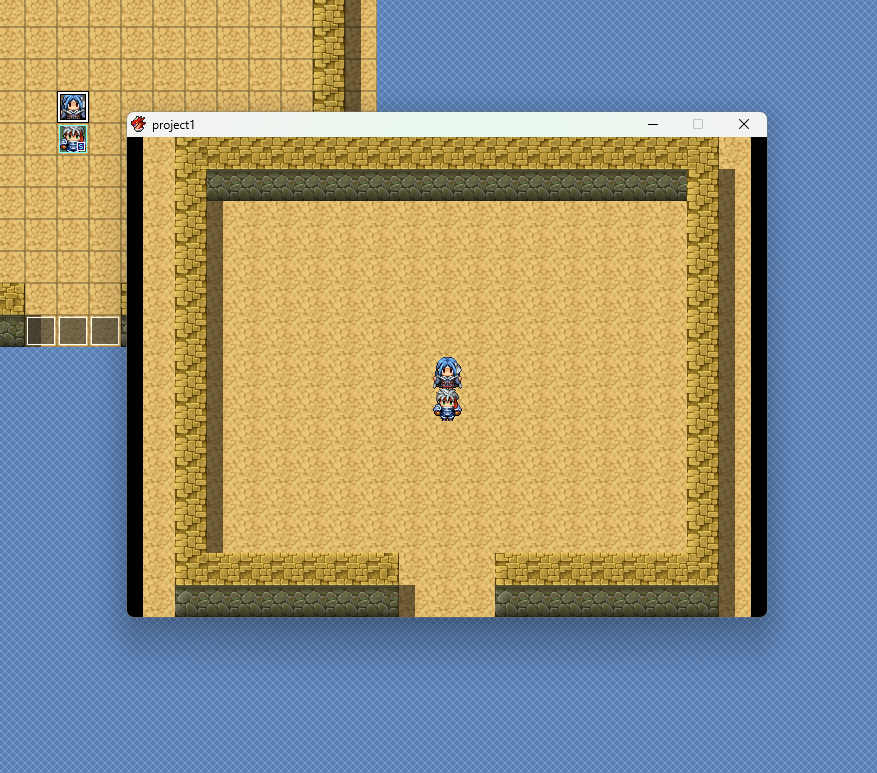
I resized my Vxace window to 640x480 using yanfly's "Ace Core Engine" but when I start the game, the title screen and all maps have black borders on the left and right edges of the window like the image. Any suggestions on how to fix this problem? {

Archived First Post

I resized my Vxace window to 640x480 using yanfly's "Ace Core Engine"
but when I start the game, the title screen and all maps have black borders on the left and right edges of the window like the image.

Any suggestions on how to fix this problem?
Protected download

Downloads / Referenced Files

Log in to download

Log in, then follow the RPG Maker Developers Group to see these download links.

Log in to download

Referenced Images / Attachments

スクリーンショット 2023-07-13 233644.png
Creator Claims / Removal

If you are the original creator and want this listing reassigned, edited, or removed, join BMMPlay and contact the moderators with proof that matches the original RPG Maker Web profile, linked GitHub, itch.io page, or another public creator identity.

#039#rpg-maker-archive#vxace-support

Replies (0)

No replies yet.

0 replies 1 view

Log in to reply.

User Avatar