



public

Rpg Maker Developers Group

Simple enough for a child, powerful enough for a developer

2 Followers

Can you adjust the size of the event window?

BMM_Archive · July 15, 2026

Preserved forum archive. This topic stores the original first post and locally mirrored RPG Maker Web attachments when available. It is posted by the BMMPlay archive account, not by the original creator.

Original Source

  • Original title: Can you adjust the size of the event window?
  • Original author: solaris32
  • Original date: May 30, 2016
  • Source thread: https://forums.rpgmakerweb.com/threads/can-you-adjust-the-size-of-the-event-window.62640/
  • Source forum path: Game Development Engines > Legacy Engine Support > RPG Maker MV Support

Summary

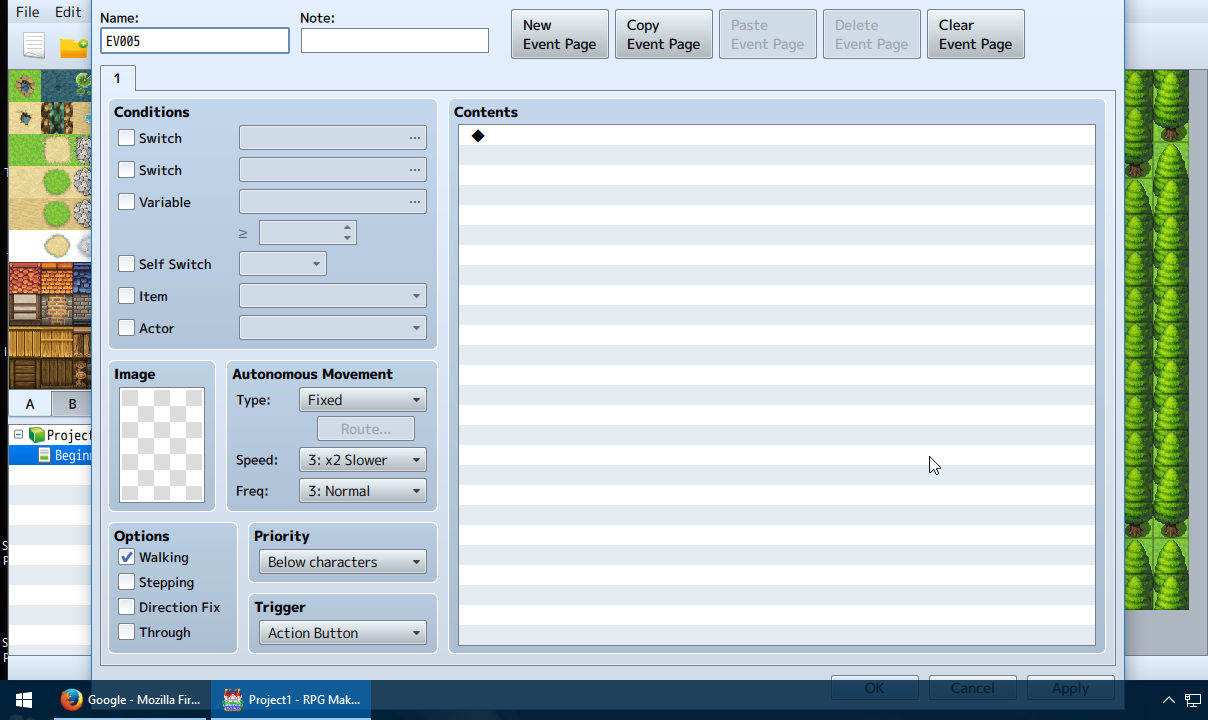
I've tried looking up a solution but all I get are talks about the resolution of a finished game. I have poor vision so my desktop resolution is 1280x720. Unfortunately this means the event window clips into my taskbar meaning I have a very slim area to click the confirm, cancel, and apply buttons. It's kind of annoying. If I increased my resolution stuff on my pc would become too small, so is there anyway to reduce the size of the event window? See attached picture to know exactly what...

Archived First Post

I've tried looking up a solution but all I get are talks about the resolution of a finished game. I have poor vision so my desktop resolution is 1280x720. Unfortunately this means the event window clips into my taskbar meaning I have a very slim area to click the confirm, cancel, and apply buttons. It's kind of annoying. If I increased my resolution stuff on my pc would become too small, so is there anyway to reduce the size of the event window? See attached picture to know exactly what I'm talking about. I'm using Windows 10.

Protected download

Downloads / Referenced Files

Log in to download

Log in, then follow the RPG Maker Developers Group to see these download links.

Log in to download

Referenced Images / Attachments

ApplicationFrameHost_2016-05-30_08-07-04.png
Creator Claims / Removal

If you are the original creator and want this listing reassigned, edited, or removed, join BMMPlay and contact the moderators with proof that matches the original RPG Maker Web profile, linked GitHub, itch.io page, or another public creator identity.

#039#rpg-maker-archive#mv-support

Replies (0)

No replies yet.

0 replies 1 view

Log in to reply.

User Avatar