Preserved forum archive. This topic stores the original first post and locally mirrored RPG Maker Web attachments when available. It is posted by the BMMPlay archive account, not by the original creator.
Original Source
Original title: Can't figure out this event transfer idea I have
Source forum path: Game Development Engines > Legacy Engine Support > RPG Maker VXAce Support
Summary
Hey guys. I haven't been on this forum for a really long time, and recently I went back to my RPGMaker VX Ace game project. It is an event transfer, that I can't seem to figure out how to activate automatically. Every thing I tried, the event just didn't work how I wanted it. It works with the action button, but that is not what I am hoping for. It looks silly and wrong when you have to hit the action button, when clearly you are in the water after...
Bmmplay may earn a commission from qualifying purchases made through these links.
Archived First Post
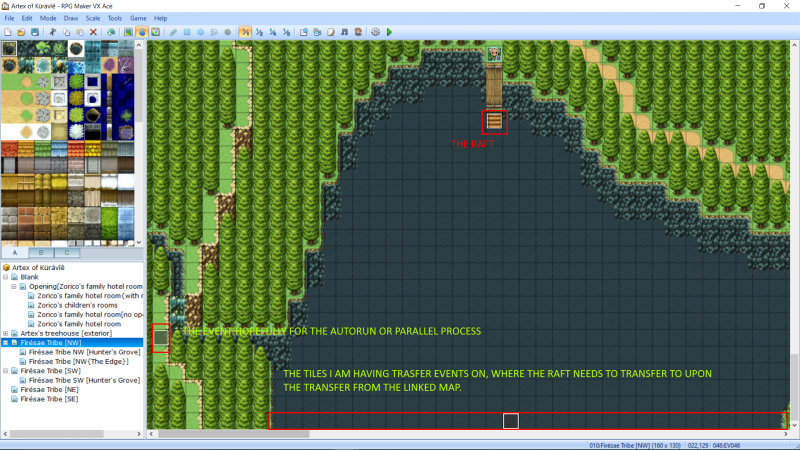
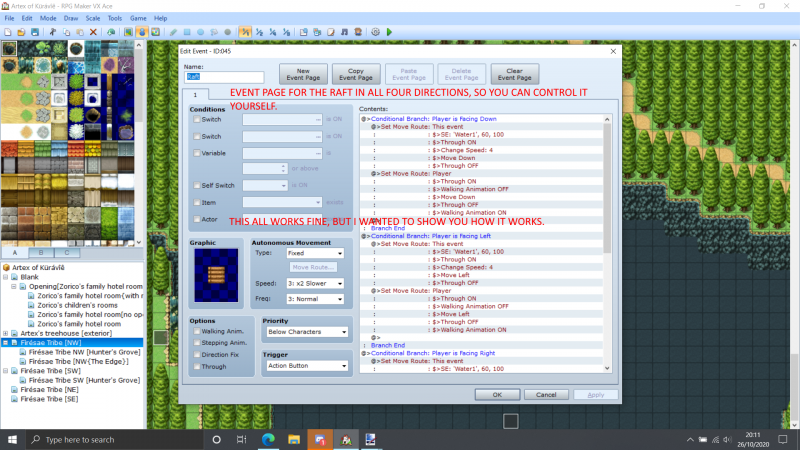
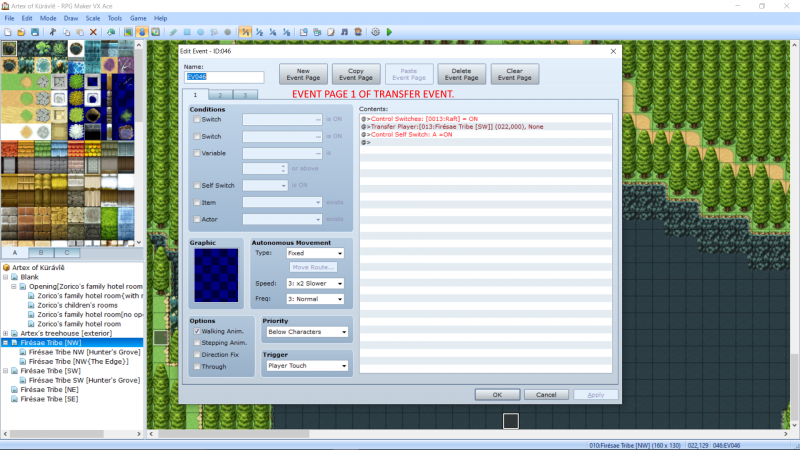
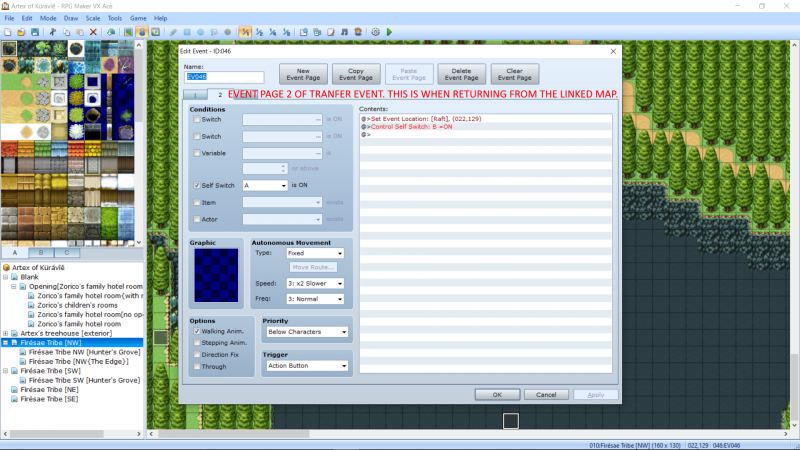
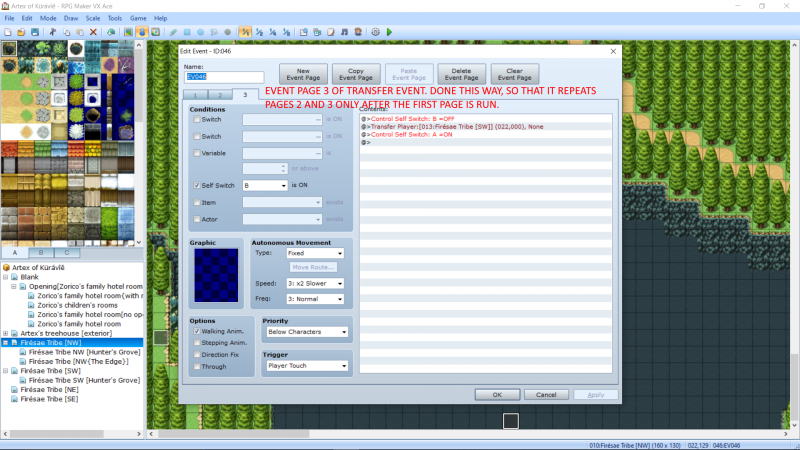
Hey guys. I haven't been on this forum for a really long time, and recently I went back to my RPGMaker VX Ace game project. It is an event transfer, that I can't seem to figure out how to activate automatically. Every thing I tried, the event just didn't work how I wanted it. It works with the action button, but that is not what I am hoping for. It looks silly and wrong when you have to hit the action button, when clearly you are in the water after the transfer from the linked map.
The problem. The event transfer is what I have as a raft, that I want to activate upon returning to the prior map I made the event on, but I have yet to figure out how it is done. It's a lake I made, and I'd need a transfer event for every tile on the water, which means an event transfer for every single one of those transfer events, and I don't even know where to begin with variables. I still don't understand variables. I tried using a Switch, but my brain just goes caput when trying to code the Switch so it works. I remember asking about variables before, but then I remade that event recently without variables, and it works the exact same way.
My idea is, as you exit the linked map[transfer event], the raft is there ready[event transfer] for the player to control again, like the raft is the same raft from the linked map, at either one of the coordinates of the lake wherever the player is transferred from the linked map.
Anyone able to shed some light on this matter please? It's really frustrating me. I also tried searching for answers to this, with similar threads, but none of those were helping me. A lot explained the use of variables which I just can't understand unless it is literally written for dummies. Below are the screenshots for you.
Protected downloadProtected downloadProtected downloadProtected downloadProtected download
Downloads / Referenced Files
Log in to download
Log in, then follow the RPG Maker Developers Group to see these download links.
RPGMaker problem screenshot 1.pngRPGMaker problem screenshot 2.pngRPGMaker problem screenshot 3.pngRPGMaker problem screenshot 4.pngRPGMaker problem screenshot 5.png
Creator Claims / Removal
If you are the original creator and want this listing reassigned, edited, or removed, join BMMPlay and contact the moderators with proof that matches the original RPG Maker Web profile, linked GitHub, itch.io page, or another public creator identity.




 Playstation DualSense Charging Station
Dock-style charging station for keeping two DualSense controllers ready between sessions.
View on Amazon
Playstation DualSense Charging Station
Dock-style charging station for keeping two DualSense controllers ready between sessions.
View on Amazon