


Adding Fire and other questions
BMM_Archive · July 15, 2026

Preserved forum archive. This topic stores the original first post and locally mirrored RPG Maker Web attachments when available. It is posted by the BMMPlay archive account, not by the original creator.
Original Source
- Original title: Adding Fire and other questions
- Original author: lokiie1984
- Original date: November 6, 2016
- Source thread: https://forums.rpgmakerweb.com/threads/adding-fire-and-other-questions.70661/
- Source forum path: Game Development Engines > Legacy Engine Support > RPG Maker MV Support
Summary
{ "lightbox_close": "Close", "lightbox_next": "Next", "lightbox_previous": "Previous",
Archived First Post
Protected download
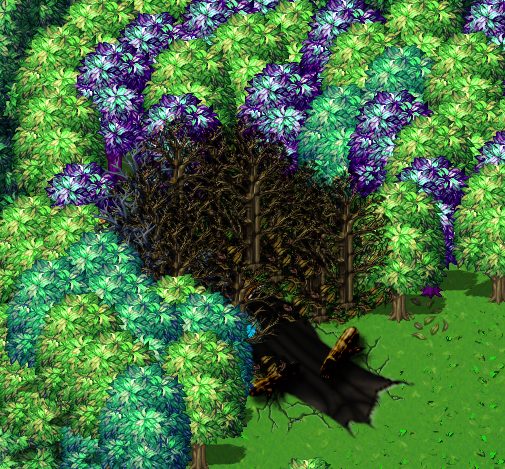
The picture above is meant to be a ship crash site where the character starts the map. I wanted to have the dead trees be on fire, hopefully animated but i really have no idea how to go about doing that. I used the parallax method to create the map. (Doing most of the work in Photoshop.) Then ported it back into rpg maker MV to tinker with it some more. However, i don't see any fire tiles, other then lava and stuff like that.
I suppose if it comes down to it i could use still fire in Photoshop and just shrink it down. Might look decent.
Anyway any ideas on how this might be done?
For reference i used PandaMaru's trees, and it's hard to see, but there is a plane/ship in there by Fitsbach.
The picture above is meant to be a ship crash site where the character starts the map. I wanted to have the dead trees be on fire, hopefully animated but i really have no idea how to go about doing that. I used the parallax method to create the map. (Doing most of the work in Photoshop.) Then ported it back into rpg maker MV to tinker with it some more. However, i don't see any fire tiles, other then lava and stuff like that.
I suppose if it comes down to it i could use still fire in Photoshop and just shrink it down. Might look decent.
Anyway any ideas on how this might be done?
For reference i used PandaMaru's trees, and it's hard to see, but there is a plane/ship in there by Fitsbach.
Downloads / Referenced Files
Log in to download
Log in, then follow the RPG Maker Developers Group to see these download links.
Log in to downloadReferenced Images / Attachments
Creator Claims / Removal
If you are the original creator and want this listing reassigned, edited, or removed, join BMMPlay and contact the moderators with proof that matches the original RPG Maker Web profile, linked GitHub, itch.io page, or another public creator identity.


Replies (0)
No replies yet.
0
replies
7
views
Topic Summary
Loading summary...
