


VX ACE - Alter A2 ("Ground") Tilemap Interpretation?
BMM_Archive · July 15, 2026

Original Source
- Original title: VX ACE - Alter A2 ("Ground") Tilemap Interpretation?
- Original author: QuietlySilver
- Original date: May 10, 2020
- Source thread: https://forums.rpgmakerweb.com/threads/vx-ace-alter-a2-ground-tilemap-interpretation.121345/
- Source forum path: Game Development Engines > Legacy Engine Support > RPG Maker VXAce Support
Summary
Hello! I'm back again with another question - this time regarding the function of the Set A tileset. I'm currently in the midst of creating my custom tilesets, and I wanted to clarify several things before I went through the effort of painting, as any miscalculations on my part will effectively off-set the remainder of the pattern in the map editor. After reviewing the VX ACE manual for all its available info on tilesets, I exported the default interior A2 tileset from VX ACE to check my dimensions. To my...


Archived First Post
I'm currently in the midst of creating my custom tilesets, and I wanted to clarify several things before I went through the effort of painting, as any miscalculations on my part will effectively off-set the remainder of the pattern in the map editor. After reviewing the VX ACE manual for all its available info on tilesets, I exported the default interior A2 tileset from VX ACE to check my dimensions. To my understanding, the default interior A2 set is 16x12 tiles long, which equates to 512x384 total pixels since each individual tile is 32x32 pixels.
Set A performs differently than Sets B-E in that Set A houses animated tiles (source file A1) and auto-tiles (source files A2, A3, and A4) split into particular columns with specific behaviors according to mode type (area or field), plus one normal set (source file A5), but Sets B-E are mainly decorative and render as the top layer on the game map, right?
And to break down Set A -> A1 = animated tiles, A2 = ground tiles, A3 = building tiles, A4 = wall tiles, A5 = normal tiles, yes?
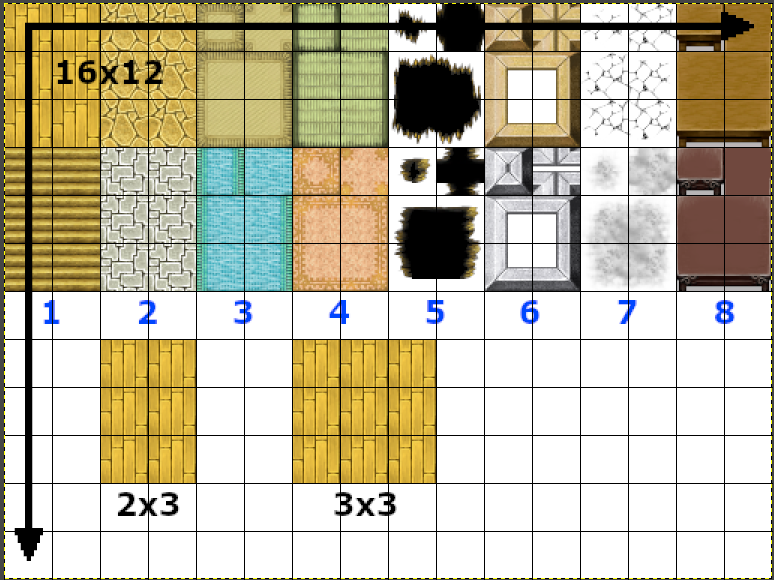
I'm currently sketching my A2 set, so I want to know - A2 source files are interpreted in 3x2 (row x column) sections. In the screenshot below, I took the default Interior_A2 and applied a 32x32 grid, then labeled each pattern section with a blue number. I've isolated the first section below in its typical 3x2 format, and expanded it by one more tile to make it 3x3 to help visualize my first question - is it possible to create an A2 section that can be interpreted as 3x3 rather than 3x2?
I ask because the ground I've sketched for my A2 set has much more variety - meaning, I can't have a repeating auto-tile that's only two tiles wide because the ground I've sketched has three separate components across. Squeezing the alternating patterns into two tiles looks cluttered and sloppy, so I'd rather not if I can avoid it. That being said, the way A2 sets are interpreted may just be built into the VX ACE engine and can't be changed. But if there's some method that allows me to change the default A2 3x2 format into 3x3, I'd love to know! If it's impossible, I can just re-draw the first couple patterns, no worries.
My other questions are just practical ones - are [the blue-numbered] columns 1 and 2, 3 and 4, and 5, 6, 7, and 8 all interpreted differently? 1 and 2 are consistent patterns regardless, but 3 and 4 have rugs with borders, and 5-8 can be layered on top of other ground tiles. Auto-tiles are also a bit more complex in that they can be broken into 16x16 mini-tiles for the editor to interpret correctly. I assume I must take these behaviors into consideration when creating my own tileset? And if my understanding of their functions is incorrect, can someone point me in the right direction?
Thank you for the help! I appreciate any and all tips! :')
Downloads / Referenced Files
Log in, then follow the RPG Maker Developers Group to see these download links.
Log in to downloadReferenced Images / Attachments
Creator Claims / Removal
If you are the original creator and want this listing reassigned, edited, or removed, join BMMPlay and contact the moderators with proof that matches the original RPG Maker Web profile, linked GitHub, itch.io page, or another public creator identity.
Replies (0)
No replies yet.
Topic Summary
Loading summary...
