




Preserved forum archive. This topic stores the original first post and locally mirrored RPG Maker Web attachments when available. It is posted by the BMMPlay archive account, not by the original creator.
Original Source
- Original title: Error calling event to trigger cutscene.
- Original author: ZeroRaven87
- Original date: May 3, 2020
- Source thread: https://forums.rpgmakerweb.com/threads/error-calling-event-to-trigger-cutscene.121066/
- Source forum path: Game Development Engines > Legacy Engine Support > RPG Maker VXAce Support
Summary
Hi folks, So I'm presently having trouble calling events to run a cutscene in my game. Flow is as follows: - Player selects new game.
Archived First Post
Hi folks,
So I'm presently having trouble calling events to run a cutscene in my game.
Flow is as follows:
- Player selects new game.
- Transferred to new screen where opening text runs.
-- Select Name
---Text Continues
----Select Gender
-----Text concludes, fade out.
This part is where things fail to work properly
- Transfer player to point on cutscene map.
--Fade screen in.
---Autorun 2 walking characters, when character 1 hits end of move route, set Switch001 (Cutscene) to ON
----Event (switch001 CUTSCENE = ON) play character exchange.
Everything runs smoothly until the 2 characters finish they're move route, which SHOULD trigger switch001, which SHOULD trigger the event to run since SWITCH001 has been set to ON.
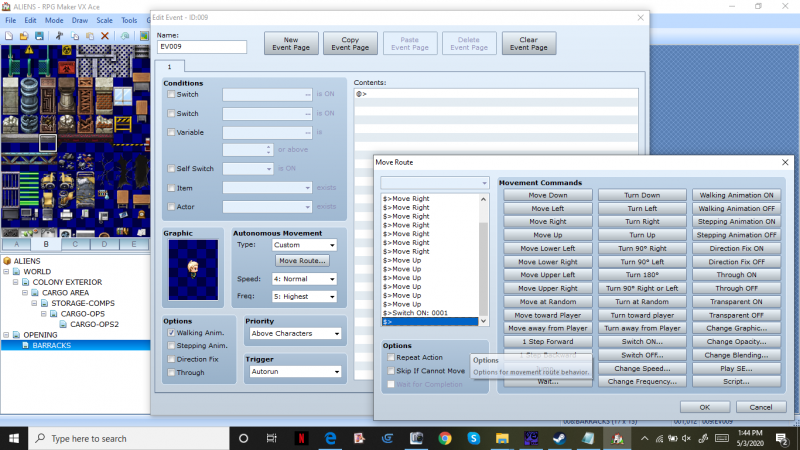
This SC shows the move route that triggers SWITCH 001 to ON
Protected download
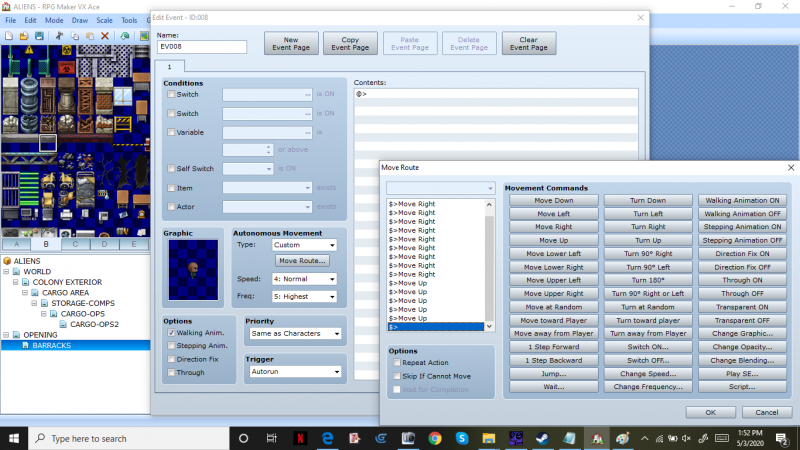
This Screenshot shows the 2nd character movement event. Note this one does NOT trigger Switch 001.
Protected download
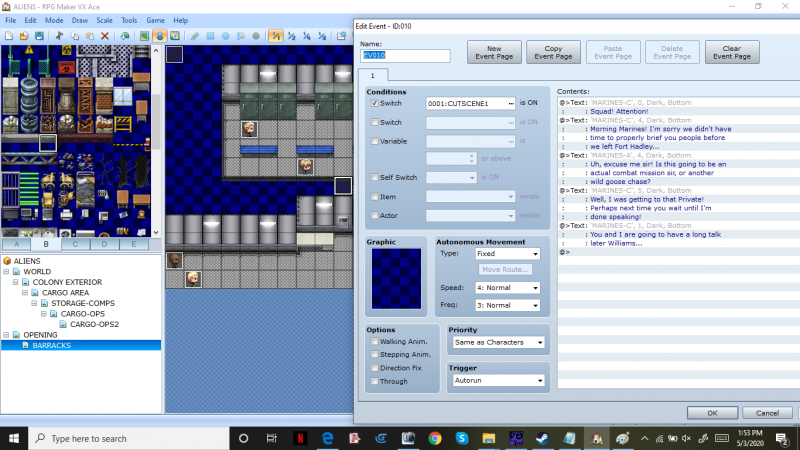
This Screenshot shows the event that SHOULD be triggered by Switch 001.
Protected download
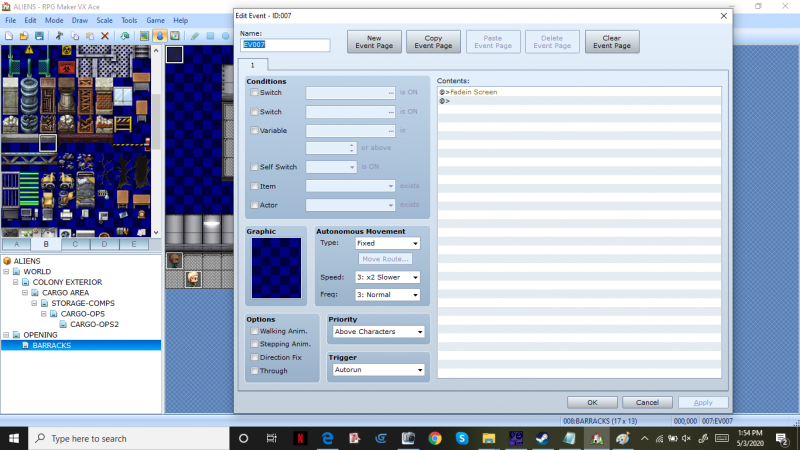
This event is the Fade screen in event. It SHOULDN'T affect anything else.
Protected download
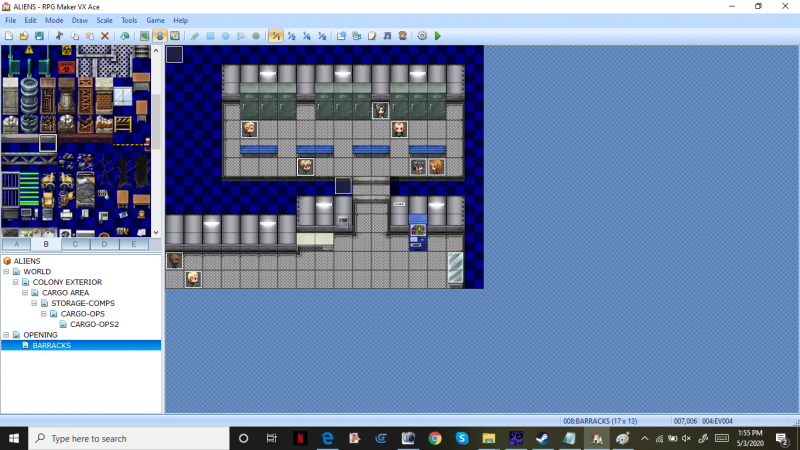
This Screenshot shows an over view of the cutscene area. The 2 actors in the lower left follow the move route till they're in the spaces below the blue benches above the "hallway". The Player is the Blonde actor below the 2nd bench. The remaining 5 are just empty events with character pictures.
Protected download
I've tried multiple combinations of autorun events, trying to trigger switch 001. I've set the characters to walk based on 001 being ON. I've tried setting 001 to on once the NPCs finish walk route (current set up), and I can't figure how to get it to run.
Any assistance would be much appreciated.
So I'm presently having trouble calling events to run a cutscene in my game.
Flow is as follows:
- Player selects new game.
- Transferred to new screen where opening text runs.
-- Select Name
---Text Continues
----Select Gender
-----Text concludes, fade out.
This part is where things fail to work properly
- Transfer player to point on cutscene map.
--Fade screen in.
---Autorun 2 walking characters, when character 1 hits end of move route, set Switch001 (Cutscene) to ON
----Event (switch001 CUTSCENE = ON) play character exchange.
Everything runs smoothly until the 2 characters finish they're move route, which SHOULD trigger switch001, which SHOULD trigger the event to run since SWITCH001 has been set to ON.
This SC shows the move route that triggers SWITCH 001 to ON
Protected download
This Screenshot shows the 2nd character movement event. Note this one does NOT trigger Switch 001.
Protected download
This Screenshot shows the event that SHOULD be triggered by Switch 001.
Protected download
This event is the Fade screen in event. It SHOULDN'T affect anything else.
Protected download
This Screenshot shows an over view of the cutscene area. The 2 actors in the lower left follow the move route till they're in the spaces below the blue benches above the "hallway". The Player is the Blonde actor below the 2nd bench. The remaining 5 are just empty events with character pictures.
Protected download
I've tried multiple combinations of autorun events, trying to trigger switch 001. I've set the characters to walk based on 001 being ON. I've tried setting 001 to on once the NPCs finish walk route (current set up), and I can't figure how to get it to run.
Any assistance would be much appreciated.
Downloads / Referenced Files
Log in to download
Log in, then follow the RPG Maker Developers Group to see these download links.
Log in to downloadReferenced Images / Attachments
Creator Claims / Removal
If you are the original creator and want this listing reassigned, edited, or removed, join BMMPlay and contact the moderators with proof that matches the original RPG Maker Web profile, linked GitHub, itch.io page, or another public creator identity.
Replies (0)
No replies yet.
0
replies
1
view
Topic Summary
Loading summary...


