


VX ACE - Conditional Branch "Z Button Is Being Pressed" Issue?
BMM_Archive · July 15, 2026

Original Source
- Original title: VX ACE - Conditional Branch "Z Button Is Being Pressed" Issue?
- Original author: QuietlySilver
- Original date: April 21, 2020
- Source thread: https://forums.rpgmakerweb.com/threads/vx-ace-conditional-branch-z-button-is-being-pressed-issue.120482/
- Source forum path: Game Development Engines > Legacy Engine Support > RPG Maker VXAce Support
Summary
Hello! This is my first thread on the forum, so I apologize if I've incorrectly categorized/posted anything beneath the wrong section - I usually attempt to solve my own errors, so I've never done this before, ha. I'm currently working on a custom main menu, and I've been held up by a conditional issue. I've implemented a "skip title processing" command to instead create my own introductory sequence and main menu with custom options (for both aesthetic purposes and so I can expand upon the default menu options - Start,...
Archived First Post
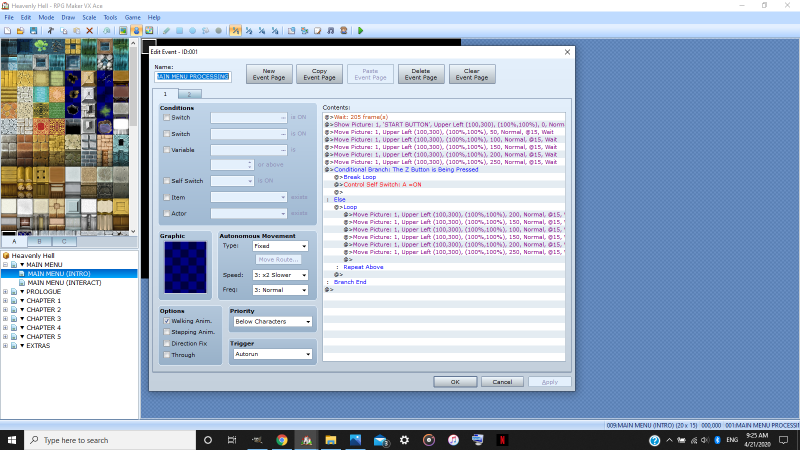
I'm currently working on a custom main menu, and I've been held up by a conditional issue. I've implemented a "skip title processing" command to instead create my own introductory sequence and main menu with custom options (for both aesthetic purposes and so I can expand upon the default menu options - Start, Continue, Exit - to add configuration, chapter replayability, and bonus content). Everything operates perfectly until I reach the conditional branch, wherein I want the player to be able to progress to the actual "main menu" I've created on the next map by pressing "Z"; otherwise ("else"), the introductory screen operates as "normal" - with the game logo as a parallax background and my "PRESS START BUTTON" message displayed as a picture, which "moves" between opacities to create a "flashing" effect.
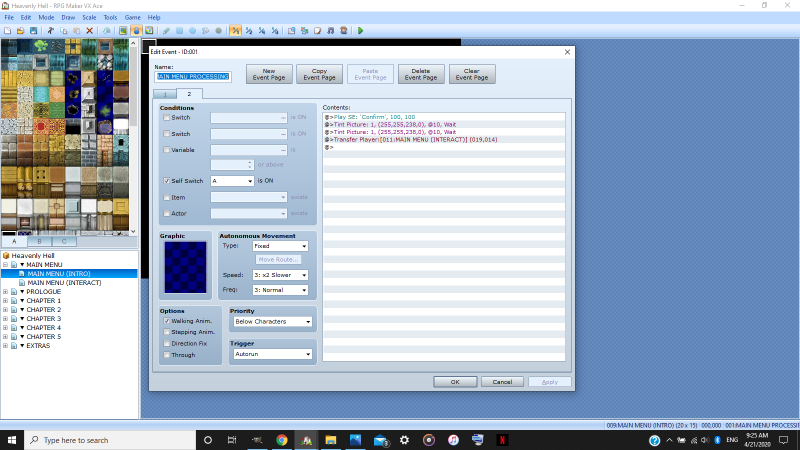
Obviously, I want the player to be able to press "Z" at any time, so the process must be constantly checking if the condition has been met - otherwise the player has to randomly press "Z" during the same tiny millisecond that the condition is being checked, which is both nearly impossible and really stupid, ha. Pressing "Z" should meet the conditions for the next series of commands, wherein my "CONFIRM" sound effect plays, the "PRESS START BUTTON" flashes white, and the player is transferred to the actual main menu screen with choosable options.
I assume the issue arises in the loop I've also included - which is necessary to create the "flashing" effect for the "PRESS START BUTTON" message. I'd like to retain the "flashing" effect and I'm unsure of how to do so without the "loop" command; I don't want the "flashing" to lag/sputter/stop during the transition for the sake of quality. The event is currently activated via "autorun" and I've attempted "parallel process" as well - but neither trigger seems to work. There's likely a more efficient method and what I'm doing is needlessly complex, but I'm operating on three hours of sleep and I think my brain is rather sluggish at the moment; quarantine and college do not mix.
I've included screenshots of the event pages below:
Protected download
Protected download
TL;DR - basically, I want the player to be able to progress to the "next screen" by pressing a button without interrupting the "flashing" message process.
Sorry for such a lengthy post! I'm always happy to provide clarification if my questions are confusing! :')
I'm just grateful for any bit of help. Thank you so much, and have a nice day!
Downloads / Referenced Files
Log in, then follow the RPG Maker Developers Group to see these download links.
Log in to downloadReferenced Images / Attachments
Creator Claims / Removal
If you are the original creator and want this listing reassigned, edited, or removed, join BMMPlay and contact the moderators with proof that matches the original RPG Maker Web profile, linked GitHub, itch.io page, or another public creator identity.
Replies (0)
No replies yet.
Topic Summary
Loading summary...

