Preserved forum archive. This topic stores the original first post and locally mirrored RPG Maker Web attachments when available. It is posted by the BMMPlay archive account, not by the original creator.
Source forum path: Game Development Engines > Legacy Engine Support > RPG Maker MV Support
Summary
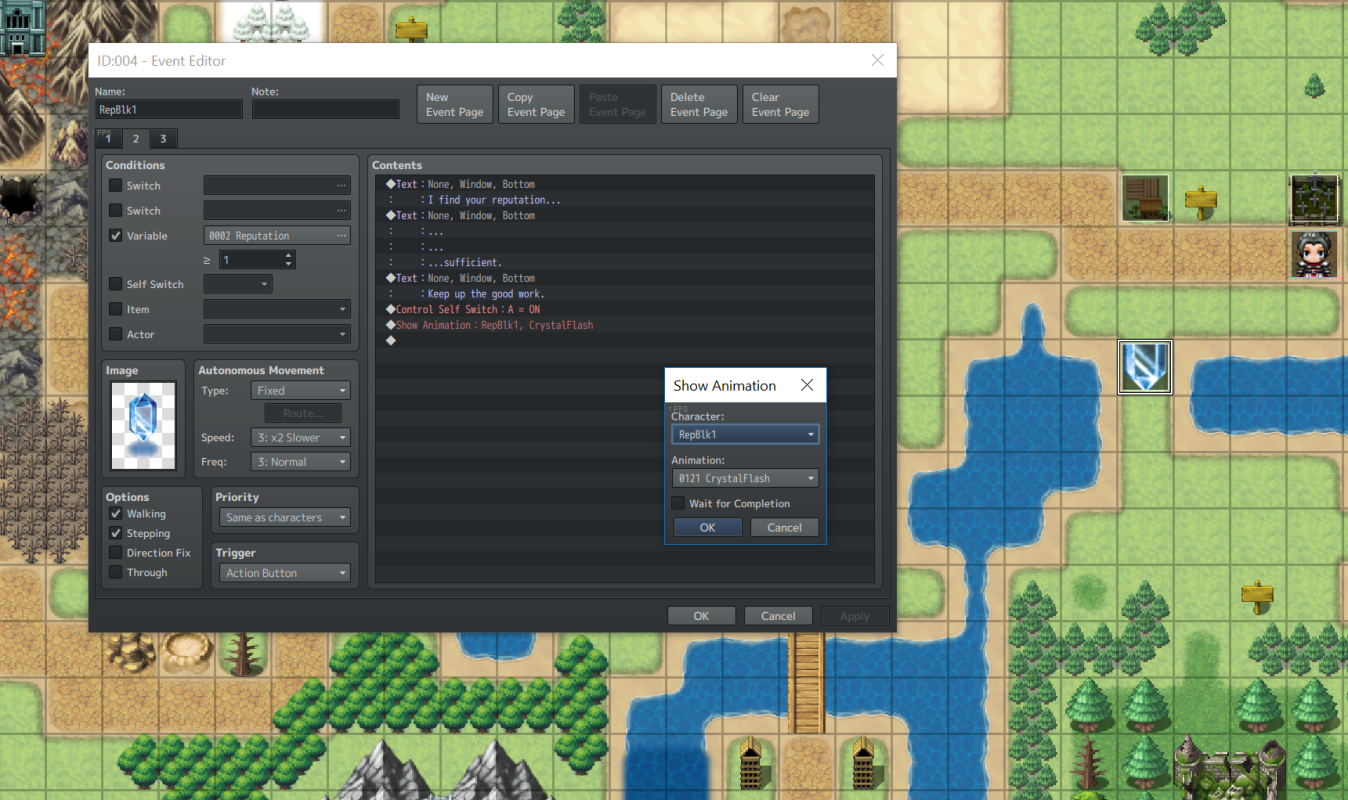
Apologies if this is a repeat. I tried to search for an answer to my question, but I've had no luck - and I realize that this might be n00b territory, but I've only been using the software for about 48 hours and have tried watching tutorial videos. Now, onto the question/problem: I am trying to call an animation to appear over an event after my player character has interacted with it. (Screenshot below.) Every time I test the functionality, the animation appears in the center of the screen, despite...
Archived First Post
Apologies if this is a repeat. I tried to search for an answer to my question, but I've had no luck - and I realize that this might be n00b territory, but I've only been using the software for about 48 hours and have tried watching tutorial videos.
Now, onto the question/problem:
I am trying to call an animation to appear over an event after my player character has interacted with it. (Screenshot below.) Every time I test the functionality, the animation appears in the center of the screen, despite what I put in the options box. I realize that I could make a custom animation and offset it to appear over the event, but I plan to do quite a few of these and do not want to have to make a custom-positioned animation for each one.
Is there a simple way/complex way to tell the event to call the animation at specific X,Y coordinates? I'm not afraid to script it, but I don't want to just fumble around until I get it right.
Protected download
Downloads / Referenced Files
Log in to download
Log in, then follow the RPG Maker Developers Group to see these download links.
If you are the original creator and want this listing reassigned, edited, or removed, join BMMPlay and contact the moderators with proof that matches the original RPG Maker Web profile, linked GitHub, itch.io page, or another public creator identity.




 Kingston IronKey Locker+ 50 G2 256GB Encrypted USB Drive
Encrypted USB storage for secure files, travel documents, and work backups.
View on Amazon
Kingston IronKey Locker+ 50 G2 256GB Encrypted USB Drive
Encrypted USB storage for secure files, travel documents, and work backups.
View on Amazon
