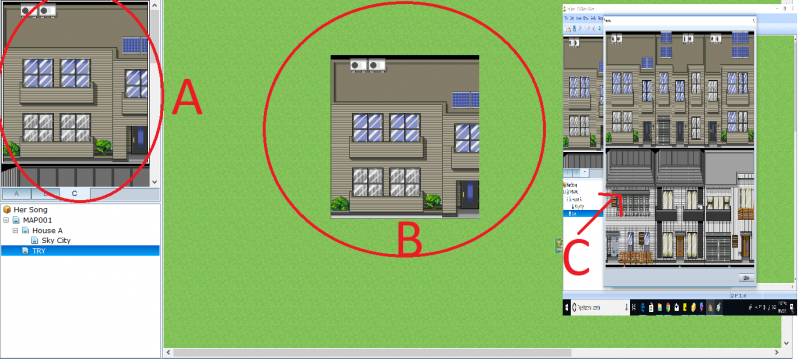
Good evening everyone, I am kinda new to making games on RMVXA. I wanted to import custom tilesets off of the internet and I have found amazing tilesets however I have no clue what I'm doing wrong. {Check the attached image please} (C) is how they look like originally when I import them to Graphics/Tilesets.
Good evening everyone,
I am kinda new to making games on RMVXA. I wanted to import custom tilesets off of the internet and I have found amazing tilesets however I have no clue what I'm doing wrong.
{Check the attached image please}
(C) is how they look like originally when I import them to Graphics/Tilesets.
(A) is how they look like when I try to use them (There doesn't seem to be a sideways scroll-bar ).
No matter where I use that tileset (A5 or B or C) it looks the same.
The artist's other tilesets work just fine and he has a tutorial on how to import everything correctly, however, It's in Japanese and Google translate is horrendous in translating it (Either that or I don't understand how I should be importing it):
http://asunana.blog.fc2.com/blog-entry-318.html#
I would appreciate the help so much <3
Protected download





 Amazon Fire TV 50-Inch 4-Series 4K UHD Smart TV
4K smart TV with Fire TV built in for streaming, games, and living room viewing.
View on Amazon
Amazon Fire TV 50-Inch 4-Series 4K UHD Smart TV
4K smart TV with Fire TV built in for streaming, games, and living room viewing.
View on Amazon