




Preserved forum archive. This topic stores the original first post and locally mirrored RPG Maker Web attachments when available. It is posted by the BMMPlay archive account, not by the original creator.
Original Source
Original title: Unwanted battle animation auto smoothing/blurring
Source forum path: Game Development Engines > Legacy Engine Support > RPG Maker MV Support
Summary
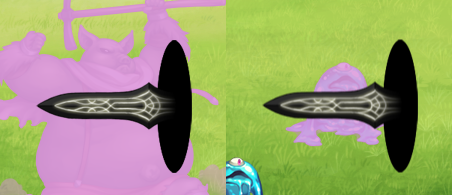
Battle animations in RMMV look fine when applied to medium-sized or big enemies, but when played over smaller enemies, such as slimes, the program blurs them, and it doesn't look very nice [EDIT: This is not what actually happens, see my last post further down the thread]: { "lightbox_close": "Close", "lightbox_next": "Next",
Archived First Post
Battle animations in RMMV look fine when applied to medium-sized or big enemies, but when played over smaller enemies, such as slimes, the program blurs them, and it doesn't look very nice [EDIT: This is not what actually happens, see my last post further down the thread]:
Protected download
This would be barely noticeable with most of the default battle animations, but it's really obvious when using animation pieces with clearly defined outlines like the sword above. Is there a way to disable this effect? (assuming it's intentional at all and not a bug). I've tested it with all plugins disabled, so it's not being triggered by any of those.
Downloads / Referenced Files
Log in to download
Log in, then follow the RPG Maker Developers Group to see these download links.
If you are the original creator and want this listing reassigned, edited, or removed, join BMMPlay and contact the moderators with proof that matches the original RPG Maker Web profile, linked GitHub, itch.io page, or another public creator identity.