


Tile display issue
BMM_Archive · July 15, 2026

Original Source
- Original title: Tile display issue
- Original author: jgrahl
- Original date: September 19, 2016
- Source thread: https://forums.rpgmakerweb.com/threads/tile-display-issue.68532/
- Source forum path: Game Development Engines > Legacy Engine Support > RPG Maker MV Support
Summary
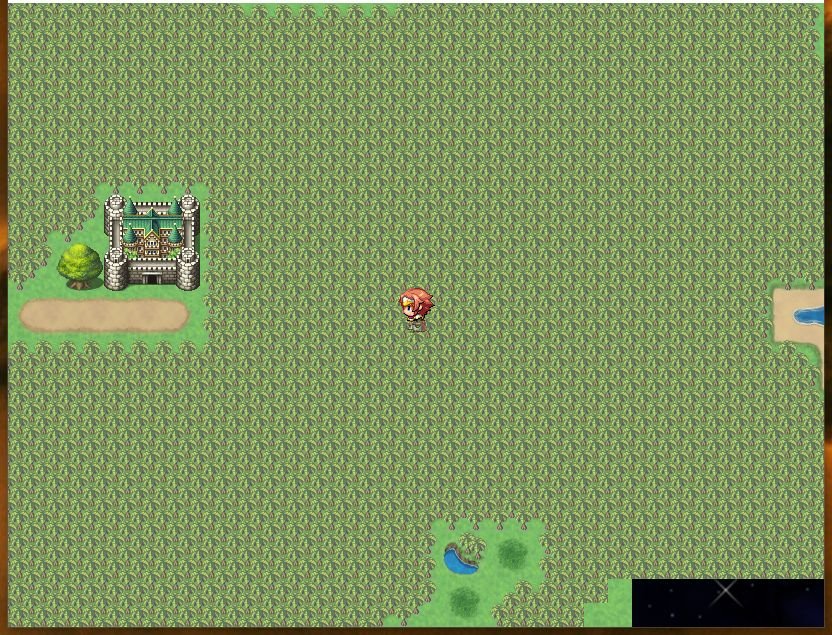
Using RMMV 1.3.1 I've been working on a game design and when I first started out, I had a weird bug where it wouldn't draw the tiles in the lower right corner. The tile on the left of the issue area draws the tile in incomplete quarters. It will show the original parallax background image instead. When I first noticed it, I had a large ocean. I reduced it's size which made it happen less. No plugins were installed at this point. Later on I noticed it started showing up again. This time it was...
Archived First Post
I've been working on a game design and when I first started out, I had a weird bug where it wouldn't draw the tiles in the lower right corner. The tile on the left of the issue area draws the tile in incomplete quarters. It will show the original parallax background image instead. When I first noticed it, I had a large ocean. I reduced it's size which made it happen less. No plugins were installed at this point. Later on I noticed it started showing up again. This time it was a large tropical forest with some other tiles on the screen.
Using the default resolution size. Using default mapping style. This is an overworld map at 256x256 with about 48K tiles drawn. It currently has 1 player transfer event.
I was trying to reproduce it and I've only been able to make it appear less. Some steps I've tried.
- resintalled video drivers even though I had the newest 372.70 Nvidia drivers.
- changing startup options to always dash OFF. Just wanted to see how it appeared when walking slower. Now, this makes it happen in a smaller area and takes about 1/4 second to disappear.
- copying the map and pasting it into a new game. Doesn't happen.
- copying the map and pasting it into a new map within the same game. Still happens.
- turned all plugins off and left them off except the screen res for the next test. Still happens.
- changed the resolution to a larger size to see how bad it was. Used Yanfly engine plugin screen resolution. This actually made it not appear when I went to 1920x1080.
- Turned Yanfly plugin off, now it's back to the small area in the lower right not drawing tiles correctly. No other plugins active.
- Removed the forest to just grass. Now it doesn't happen in the spot on the screenshot.
- Used Ctrl+Z to undo the forest clearing and it's back again.
- Still happens in the area where the ocean was.
Any ideas on how to fix it without requiring me to recreate the DB on a new game?
Protected download
Downloads / Referenced Files
Log in, then follow the RPG Maker Developers Group to see these download links.
Log in to downloadReferenced Images / Attachments
Creator Claims / Removal
If you are the original creator and want this listing reassigned, edited, or removed, join BMMPlay and contact the moderators with proof that matches the original RPG Maker Web profile, linked GitHub, itch.io page, or another public creator identity.
Replies (0)
No replies yet.
Topic Summary
Loading summary...

