


Parallel process not working.
BMM_Archive · July 15, 2026

Original Source
- Original title: Parallel process not working.
- Original author: NeoFantasy
- Original date: April 11, 2018
- Source thread: https://forums.rpgmakerweb.com/threads/parallel-process-not-working.93937/
- Source forum path: Game Development Engines > Legacy Engine Support > RPG Maker VXAce Support
Summary
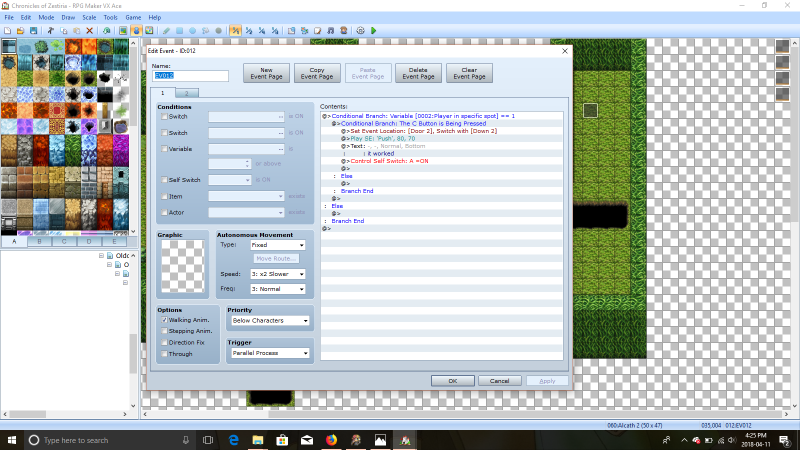
hello all. I'm attempting to have an event where if the player stands on a specific tile and pressed a button, a door will open. The issue is that the event where I want the player to stand is set to 'player touch' as I want it to play an se when they step on it. So I set up a parallel process to handle this, however it isn't working and I'm not quite sure as to what's wrong. Image
Archived First Post
The issue is that the event where I want the player to stand is set to 'player touch' as I want it to play an se when they step on it.
So I set up a parallel process to handle this, however it isn't working and I'm not quite sure as to what's wrong.
Image
Downloads / Referenced Files
Log in, then follow the RPG Maker Developers Group to see these download links.
Log in to downloadReferenced Images / Attachments
Creator Claims / Removal
If you are the original creator and want this listing reassigned, edited, or removed, join BMMPlay and contact the moderators with proof that matches the original RPG Maker Web profile, linked GitHub, itch.io page, or another public creator identity.


Replies (0)
No replies yet.
Topic Summary
Loading summary...
