Preserved forum archive. This topic stores the original first post and locally mirrored RPG Maker Web attachments when available. It is posted by the BMMPlay archive account, not by the original creator.
Original Source
- Original title: Help with event rotation
- Original author: Arise
- Original date: September 15, 2016
- Source thread: https://forums.rpgmakerweb.com/threads/help-with-event-rotation.68352/
- Source forum path: Game Development Engines > Legacy Engine Support > RPG Maker MV Support
Summary
Hi! I need some help. I've added the mouse plugin, and it seems that I can click on some event and I can make it print the message in the javascript console. So I know that clicking on the event works every time.
Archived First Post
Hi!
I need some help.
I've added the mouse plugin, and it seems that I can click on some event and I can make it print the message in the javascript console.
So I know that clicking on the event works every time.
The event is using an actor image, and I set it up as a starting point looking down (the direction).
Now I want that every time I click on the event, it should turn in clock wise direction, first click to the left, second time to go facing up, third click it should go to right and fourth click it should return to the original position (that would be facing down).
The problem is it not working as it should, every click is registered in the console, but it always prints that is facing right over and over again. Also is not really rotating.
I managed to get it rotating if I move my actor around it, it moves only one time, but still can't say why this depends on the actor.
Please help, thanks!
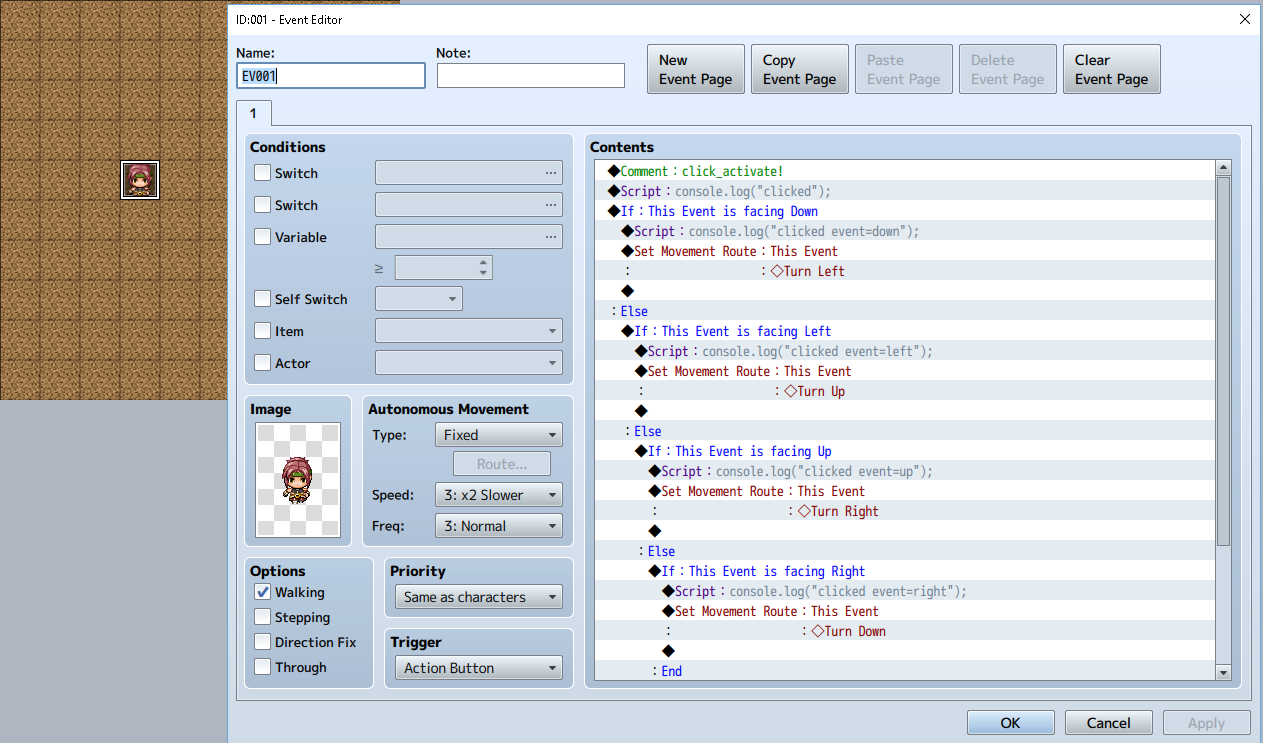
My code is below...
Protected download
I need some help.
I've added the mouse plugin, and it seems that I can click on some event and I can make it print the message in the javascript console.
So I know that clicking on the event works every time.
The event is using an actor image, and I set it up as a starting point looking down (the direction).
Now I want that every time I click on the event, it should turn in clock wise direction, first click to the left, second time to go facing up, third click it should go to right and fourth click it should return to the original position (that would be facing down).
The problem is it not working as it should, every click is registered in the console, but it always prints that is facing right over and over again. Also is not really rotating.
I managed to get it rotating if I move my actor around it, it moves only one time, but still can't say why this depends on the actor.
Please help, thanks!
My code is below...
◆Comment:click_activate!
◆Script:console.log("clicked");
◆If:This Event is facing Down
◆Script:console.log("clicked event=down");
◆Set Movement Route:This Event
: :◇Turn Left
◆
:Else
◆If:This Event is facing Left
◆Script:console.log("clicked event=left");
◆Set Movement Route:This Event
: :◇Turn Up
◆
:Else
◆If:This Event is facing Up
◆Script:console.log("clicked event=up");
◆Set Movement Route:This Event
: :◇Turn Right
◆
:Else
◆If:This Event is facing Right
◆Script:console.log("clicked event=right");
◆Set Movement Route:This Event
: :◇Turn Down
◆
:End
◆
:End
◆
:End
◆
:End
◆Exit Event Processing
◆Script:console.log("clicked");
◆If:This Event is facing Down
◆Script:console.log("clicked event=down");
◆Set Movement Route:This Event
: :◇Turn Left
◆
:Else
◆If:This Event is facing Left
◆Script:console.log("clicked event=left");
◆Set Movement Route:This Event
: :◇Turn Up
◆
:Else
◆If:This Event is facing Up
◆Script:console.log("clicked event=up");
◆Set Movement Route:This Event
: :◇Turn Right
◆
:Else
◆If:This Event is facing Right
◆Script:console.log("clicked event=right");
◆Set Movement Route:This Event
: :◇Turn Down
◆
:End
◆
:End
◆
:End
◆
:End
◆Exit Event Processing
Protected download


Downloads / Referenced Files
Log in to download
Log in, then follow the RPG Maker Developers Group to see these download links.
Log in to downloadReferenced Images / Attachments
Creator Claims / Removal
If you are the original creator and want this listing reassigned, edited, or removed, join BMMPlay and contact the moderators with proof that matches the original RPG Maker Web profile, linked GitHub, itch.io page, or another public creator identity.
Replies (0)
No replies yet.
0
replies
1
view
Topic Summary
Loading summary...