


Information/ Help with Animated Characters/Enemies
BMM_Archive · July 15, 2026

Original Source
- Original title: Information/ Help with Animated Characters/Enemies
- Original author: RPGCrystal
- Original date: September 7, 2016
- Source thread: https://forums.rpgmakerweb.com/threads/information-help-with-animated-characters-enemies.67974/
- Source forum path: Game Development Engines > Legacy Engine Support > RPG Maker MV Support
Summary
Hi everybody! First of all, I hope this post is in the right place, please let me know if it isn't^.^ But Basically i'd just love a bit of help with animated enemies and characters. I've installed Yanfly's battlecore and the animated sv. I've used an in-game static enemy picture, and put the in the notes, and chosen one of the sv_actors just so I can test the enemy moves, which it does But what i'd really want somebody to explain to me, is which parts of the sprite sheets,...
Archived First Post
First of all, I hope this post is in the right place, please let me know if it isn't^.^ But
Basically i'd just love a bit of help with animated enemies and characters. I've installed Yanfly's battlecore and the animated sv. I've used an in-game static enemy picture, and put the <Sideview Battler: filename> in the notes, and chosen one of the sv_actors just so I can test the enemy moves, which it does
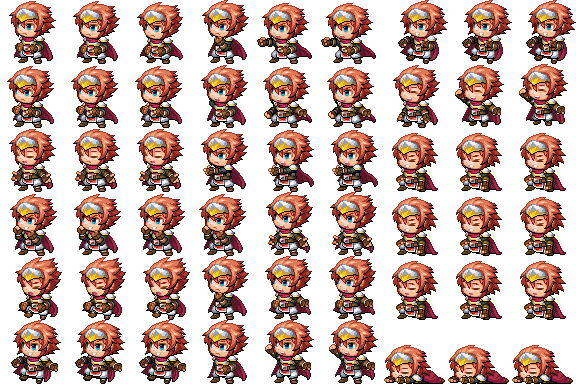
But what i'd really want somebody to explain to me, is which parts of the sprite sheets, are used for each state, and how much play is there? For Example
Is the 2 rows of 3 images in the top left used for idle animations?
Are the bottom right 3 the only ones I can use for dying/dead animations? Or can I have a longer dieing animation that spans more sprites, and if so, how do I define which sprites are used?
Like, Can I draw sprites for say 10 different attacks and have them all on one sheet, or do I need to choreograph them all separately for each attack on each character? And where do I put them
I hope i'm explaining clearly too, if i'm not, ask away and I will explain further
Thankyou very much for your time and help
Protected download
Downloads / Referenced Files
Log in, then follow the RPG Maker Developers Group to see these download links.
Log in to downloadReferenced Images / Attachments
Creator Claims / Removal
If you are the original creator and want this listing reassigned, edited, or removed, join BMMPlay and contact the moderators with proof that matches the original RPG Maker Web profile, linked GitHub, itch.io page, or another public creator identity.
Replies (0)
No replies yet.
Topic Summary
Loading summary...

