Preserved forum archive. This topic stores the original first post and locally mirrored RPG Maker Web attachments when available. It is posted by the BMMPlay archive account, not by the original creator.
Source forum path: Game Development Engines > Legacy Engine Support > RPG Maker MV Support
Summary
I am very new to RPG Maker MV and have been trying my best to figure out how to do most things but I can't seem to find the answer to an issue i am having. I don't like having the enemies display the same casting or skill animation as the characters do. for example, I have a character use a special skill, he lights up with a nifty aura thing around him, The rat enemy use the skill escape, and it also lights up with the same nifty yellow aura...
Archived First Post
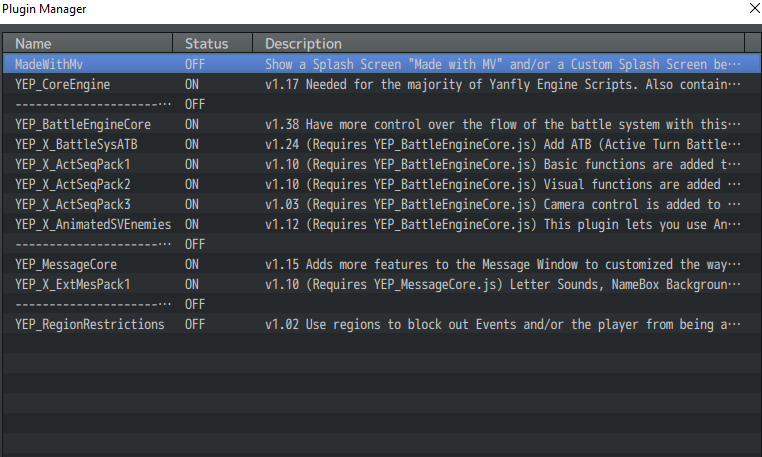
I am very new to RPG Maker MV and have been trying my best to figure out how to do most things but I can't seem to find the answer to an issue i am having. I don't like having the enemies display the same casting or skill animation as the characters do. for example, I have a character use a special skill, he lights up with a nifty aura thing around him, The rat enemy use the skill escape, and it also lights up with the same nifty yellow aura around him. I know i can go into the skills menu to change this for each individual skill, but I am hoping there is just a simple way to by default have all enemies, no matter what action they take, simply to blink or flash. similar to the set up in FF6. sorry if this has been brought up or answered else where, looked around and couldn't find anything on this. I added a photo of the plugins i am using, (also just starting to figure plugins out but couldn't figure how to do this) Thanks in advance for any help. really appreciate it
Protected download
Downloads / Referenced Files
Log in to download
Log in, then follow the RPG Maker Developers Group to see these download links.
If you are the original creator and want this listing reassigned, edited, or removed, join BMMPlay and contact the moderators with proof that matches the original RPG Maker Web profile, linked GitHub, itch.io page, or another public creator identity.




 Amaran Halo 100X COB LED Video Light
Compact bi-color studio light for YouTube, TikTok, product shots, and live streaming.
View on Amazon
Amaran Halo 100X COB LED Video Light
Compact bi-color studio light for YouTube, TikTok, product shots, and live streaming.
View on Amazon

