public

Rpg Maker Developers Group

Simple enough for a child, powerful enough for a developer

2 Followers

Player Going Through Impassable Tiles?

BMM Archive · July 15, 2026

Preserved forum archive. This topic stores the original first post and locally mirrored RPG Maker Web attachments when available. It is posted by the BMMPlay archive account, not by the original creator.

Original Source

  • Original title: Player Going Through Impassable Tiles?
  • Original author: rambamboo
  • Original date: August 16, 2016
  • Source thread: https://forums.rpgmakerweb.com/threads/player-going-through-impassable-tiles.66895/
  • Source forum path: Game Development Engines > Legacy Engine Support > RPG Maker MV Support

Summary

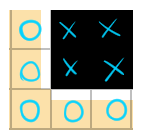
Hi! I'm making my first RPG Maker game as well as tilesets, and I'm having an issue where my player can go through impassable tiles from my tileset. I've checked and all my impassable tiles are marked by X, as well as being in A4 (Walls). It's strange because they seem to only be able to go in and out from them from specific sides. Here's a crude depiction of what's happening: My tiles are like this

Archived First Post

Hi! I'm making my first RPG Maker game as well as tilesets, and I'm having an issue where my player can go through impassable tiles from my tileset.
I've checked and all my impassable tiles are marked by X, as well as being in A4 (Walls).


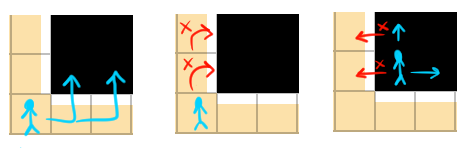
It's strange because they seem to only be able to go in and out from them from specific sides. Here's a crude depiction of what's happening:


My tiles are like this


Protected download


And here's how the player seems to be able to move within them.


Protected download
(in the 2nd one I mean that the player can't move into the black tiles, it can go into the peach tiles fine)


This is all a bit confusing since I was under the assumption that impassable = completely solid? Like you can't go inside them at all from any which way. If there's something I'm not understanding please show me what I'm doing wrong


Thanks!!

Downloads / Referenced Files

Log in to download

Log in, then follow the RPG Maker Developers Group to see these download links.

Log in to download

Referenced Images / Attachments

sc236.png
sc236.png
sc237.png
sc237.png
Creator Claims / Removal

If you are the original creator and want this listing reassigned, edited, or removed, join BMMPlay and contact the moderators with proof that matches the original RPG Maker Web profile, linked GitHub, itch.io page, or another public creator identity.

#039#rpg-maker-archive#mv-support

Replies (0)

No replies yet.

0 replies 1 view

Log in to reply.

User Avatar