




Original Source
- Original title: Dump Format Error - Unable to see map1 events
- Original author: Hisao Shou
- Original date: February 17, 2017
- Source thread: https://forums.rpgmakerweb.com/threads/dump-format-error-unable-to-see-map1-events.75025/
- Source forum path: Game Development Engines > Legacy Engine Support > RPG Maker VXAce Support
Summary
Yesterday I made some progress for my game and today when I started rpg maker all events in Map001 disppeared. I've tried to copy the file (because it had some kb, this meant that there is still data) but I've got some windows errors. I found out that Map001 file from Data was on a bad hdd sector. Then after some checks and fixes, I managed to copy map001.rvdata2 and tried to open it in a black project. Still got nothing.
Archived First Post
I've tried to copy the file (because it had some kb, this meant that there is still data) but I've got some windows errors.
I found out that Map001 file from Data was on a bad hdd sector.
Then after some checks and fixes, I managed to copy map001.rvdata2 and tried to open it in a black project. Still got nothing.
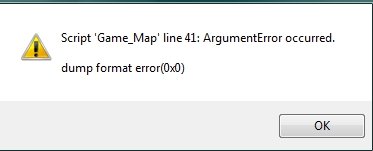
Always when I try to press New Game i get this error:
Protected download
I've tried to export the files to rpg maker MV files, because it exports the maps too, but I got errors there too.
I also tried to open map001.rvdata2 with notepad++ , the text is still there, eveything is still there, so the file IS NOT corupted.
I searched on google for a rvdata2 reader but the only thing that can read this kind of file is rpg maker editor, but the rpg maker editor wont see the map events. (the map is empty in editor)
I need any way to recover the lost data, PLEASE.
I used mostly TEXT for my game, so I need to recover the text from Show Text commands, then I will put them in another project.
It would take decades to read the hex from the map001 file, to copy it to text.
I need a way to open the file in rpg maker again , or at least to get all the show text commands from that file.
I will put the map001.rvdata2 here if anyone could solve it.
https://drive.google.com/open?id=0BzDn1ffctx8WQjRrRWtsTjF5RzA
Downloads / Referenced Files
Log in, then follow the RPG Maker Developers Group to see these download links.
Log in to downloadReferenced Images / Attachments
Creator Claims / Removal
If you are the original creator and want this listing reassigned, edited, or removed, join BMMPlay and contact the moderators with proof that matches the original RPG Maker Web profile, linked GitHub, itch.io page, or another public creator identity.
Replies (0)
No replies yet.
Topic Summary
Loading summary...
