Preserved forum archive. This topic stores the original first post and locally mirrored RPG Maker Web attachments when available. It is posted by the BMMPlay archive account, not by the original creator.
Source forum path: Game Development Engines > Legacy Engine Support > RPG Maker VXAce Support
Summary
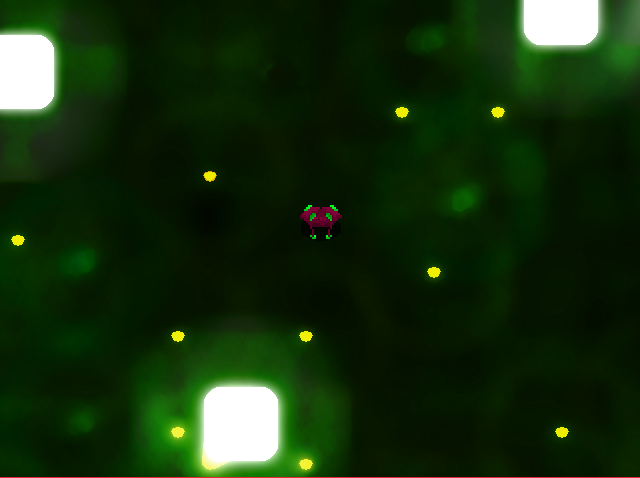
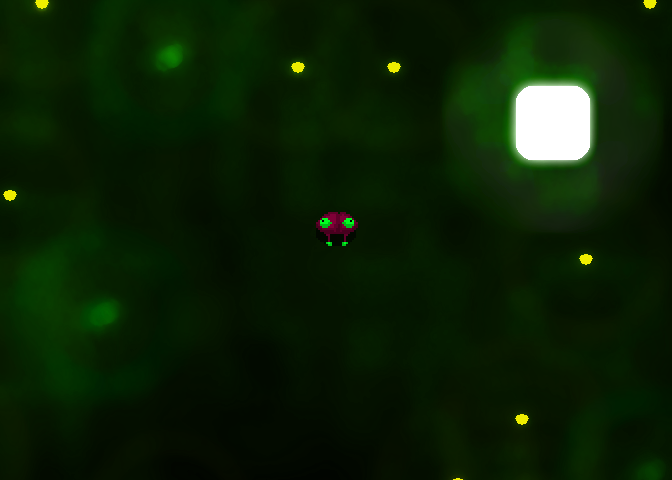
Hello! So, I've been trying out VX Ace for a while now, and I've even managed to learn a little about how the language works. Anyhow, I ran into a problem while trying to apply a parralax to a room. I added it through map properties just like you would and set it to loop. Then, when I was playtesting, as I passed a specific point on the Y-axis, the parallax was mirrored, causing it to jump between two modes, disrupting the effect of the scrolling. I attached two images,...
Bmmplay may earn a commission from qualifying purchases made through these links.
Archived First Post
Hello! So, I've been trying out VX Ace for a while now, and I've even managed to learn a little about how the language works.
Anyhow, I ran into a problem while trying to apply a parralax to a room. I added it through map properties just like you would and set it to loop. Then, when I was playtesting, as I passed a specific point on the Y-axis, the parallax was mirrored, causing it to jump between two modes, disrupting the effect of the scrolling.
I attached two images, one where I am standing on the edge the mirroring point (map007), and the other after taking one step upwards (problems).
I tried to fix it in different ways. The image size was already equal to the size of the map*32, I tried to use one of the included parallaxes, but all to no avail as it kept doing the same thing. The only thing that seemed to work was resizing it to 25% of it's original size, but that makes the parallax to small.
What do I do?
Protected download
Protected download
Downloads / Referenced Files
Log in to download
Log in, then follow the RPG Maker Developers Group to see these download links.
If you are the original creator and want this listing reassigned, edited, or removed, join BMMPlay and contact the moderators with proof that matches the original RPG Maker Web profile, linked GitHub, itch.io page, or another public creator identity.




 ANYPLUS USB C Docking Station Dual Monitor
Multiport USB-C dock for dual-monitor laptop desks and cleaner cable management.
View on Amazon
ANYPLUS USB C Docking Station Dual Monitor
Multiport USB-C dock for dual-monitor laptop desks and cleaner cable management.
View on Amazon