Preserved forum archive. This topic stores the original first post and locally mirrored RPG Maker Web attachments when available. It is posted by the BMMPlay archive account, not by the original creator.
Original Source
Original title: Single image backgrounds - Is there a way to do this, or a reason I shouldn't?
Source forum path: Game Development Engines > Legacy Engine Support > RPG Maker VXAce Support
Summary
Hello, RPG Maker community! I'm a fairly new developer, currently teaching myself how to make my own pixel art for VX Ace games - see my attachment for an example of where I'm at. I think I've got the hang of making looping tiles, autotiles, and transparency, but I realized the tileset I'm making for my current game won't actually go anywhere other than a small one-screen room. I feel like there should be a way to make a single image to serve as the background instead of a painstakingly...
Archived First Post
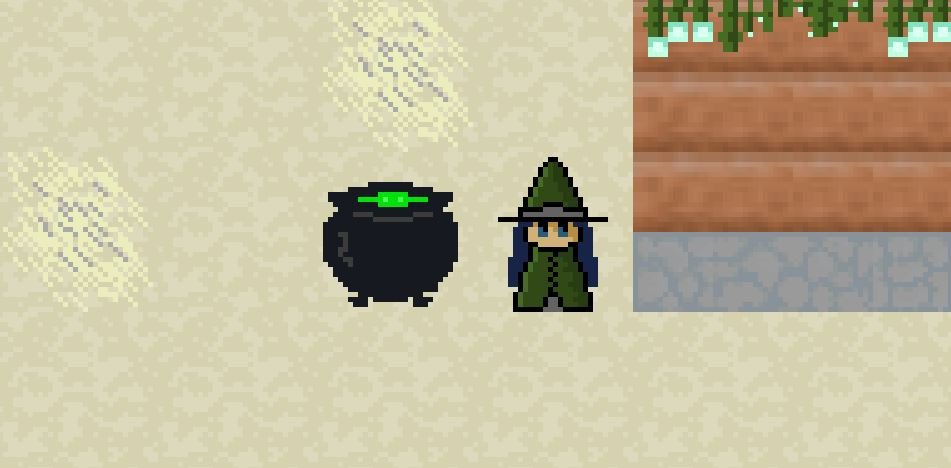
Hello, RPG Maker community! I'm a fairly new developer, currently teaching myself how to make my own pixel art for VX Ace games - see my attachment for an example of where I'm at.
I think I've got the hang of making looping tiles, autotiles, and transparency, but I realized the tileset I'm making for my current game won't actually go anywhere other than a small one-screen room. I feel like there should be a way to make a single image to serve as the background instead of a painstakingly constructed tileset, letting me create a detailed one-off environment much quicker. I could then use a completely transparent tileset just to determine what objects can be passed through. I imagine overusing this would make the game file larger and performance worse, but as long as the image is smaller than a ~500x~500 tileset it wouldn't be that big a hit, would it? Is this a common technique, and how do I go about it?
Apologies if this is a common question, I couldn't find anything and I feel like I can't describe this well enough to search for it. Thank you in advance!
Protected download
Downloads / Referenced Files
Log in to download
Log in, then follow the RPG Maker Developers Group to see these download links.
If you are the original creator and want this listing reassigned, edited, or removed, join BMMPlay and contact the moderators with proof that matches the original RPG Maker Web profile, linked GitHub, itch.io page, or another public creator identity.






 Shure MV7 USB Podcast Microphone
USB/XLR dynamic microphone for podcasting, streaming, voiceover, and creator audio.
View on Amazon
Shure MV7 USB Podcast Microphone
USB/XLR dynamic microphone for podcasting, streaming, voiceover, and creator audio.
View on Amazon