


OutsideA5 "grate" transparency?
BMM_Archive · July 15, 2026

Original Source
- Original title: OutsideA5 "grate" transparency?
- Original author: nirurin
- Original date: July 31, 2016
- Source thread: https://forums.rpgmakerweb.com/threads/outsidea5-grate-transparency.66185/
- Source forum path: Game Development Engines > Legacy Engine Support > RPG Maker MV Support
Summary
Ok so... my first question here, so I'm obviously pretty knew to RM (this was almost my second question, but I managed to solve my first issue while my question was still under moderation aha), but this issue does actually seem to be a problem with the program and not me... maybe. Maybe not. We shall see. So I know how transparencies work, and I've tested this with the standard "Outside A1" fenceposts, which show a transparency on the tileset graphic, and they do indeed work that way. I put...


Archived First Post
So I know how transparencies work, and I've tested this with the standard "Outside A1" fenceposts, which show a transparency on the tileset graphic, and they do indeed work that way. I put down some grass, and put the fenceposts on top of them, and they appear on top of the grass. As expected.
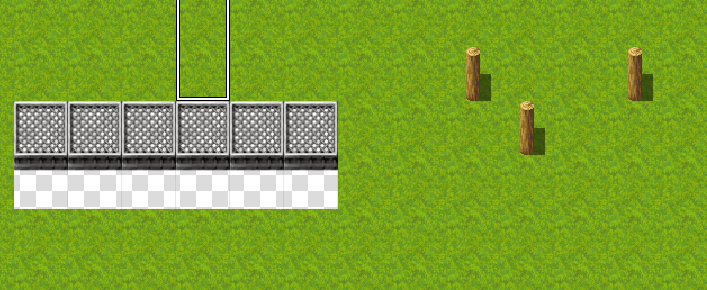
However I was playing around with some of the other tiles on the Outside tileset, and found the one that kinds looks like a grating or something on Outside_A5. I show it in the picture. It seems to be a double height tile, with a transparency underneath. Except it doesn't work (see the picture).
I did read something on the forum about an old version of RPGMaker (in reply to a very similar question) - "well, A5 is still an A tile, so there's nothing below it really which is why you got the transparency... the only A tiles that can go above other A tiles is those special tiles on A2 (see Help file for info on which are special tiles)
but since I'm sure you cannot probably do that on A2, you'd better off making that as part of the B-E tiles... or learn how to make it via autotiles so that you can probably put it up on A4"
If this is still true for MV, how come this tile is on the default A5 tileset? Are there particular tiles it can work with that I'm missing?
Thanks
Protected download
Downloads / Referenced Files
Log in, then follow the RPG Maker Developers Group to see these download links.
Log in to downloadReferenced Images / Attachments
Creator Claims / Removal
If you are the original creator and want this listing reassigned, edited, or removed, join BMMPlay and contact the moderators with proof that matches the original RPG Maker Web profile, linked GitHub, itch.io page, or another public creator identity.
Replies (0)
No replies yet.
Topic Summary
Loading summary...
