


Edge of Map Variables - Help
BMM_Archive · July 15, 2026

Original Source
- Original title: Edge of Map Variables - Help
- Original author: scarletjon
- Original date: December 20, 2016
- Source thread: https://forums.rpgmakerweb.com/threads/edge-of-map-variables-help.72493/
- Source forum path: Game Development Engines > Legacy Engine Support > RPG Maker VXAce Support
Summary
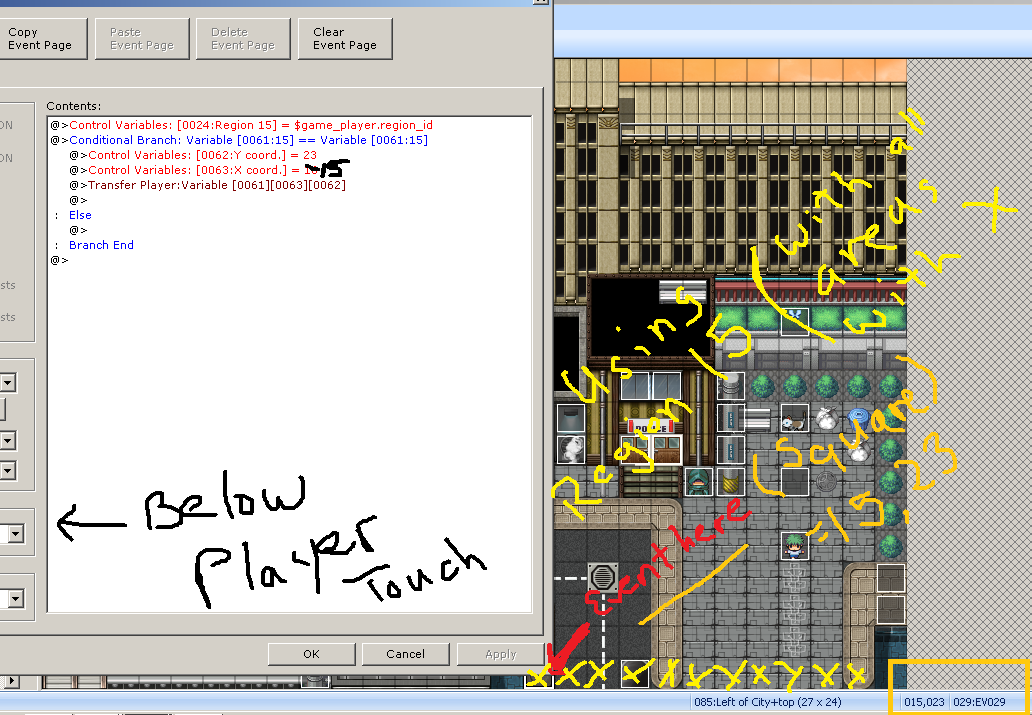
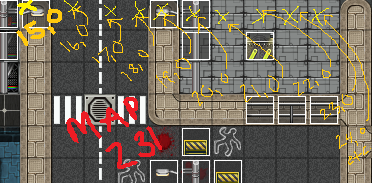
Not thinking about how much a pain this might cause in the end I made this pretty large map that I ended up cutting in two with the same tilesets: Map 085 to 231 and vice versa. I'm trying to now connect the two by using a variable edge of map region event. With a little self-research this is what I have thus far, far as what's in the image with the open event. I'm currently using Region 15 along the bottom edge of Map 085 in hopes to get the...
Archived First Post
With a little self-research this is what I have thus far, far as what's in the image with the open event. I'm currently using Region 15 along the bottom edge of Map 085 in hopes to get the other side (e.g. 231) were the yellow X's are followed by the orange coordinates. I know I'm doing a few things wrong because I keep getting the error: "Data/Map000.rvdata2 can't be found!" probably meaning I didn't specify the map ID.
Ultimately I need some words of guidance and any help is appreciated.
Protected download
Protected download
Downloads / Referenced Files
Log in, then follow the RPG Maker Developers Group to see these download links.
Log in to downloadReferenced Images / Attachments
Creator Claims / Removal
If you are the original creator and want this listing reassigned, edited, or removed, join BMMPlay and contact the moderators with proof that matches the original RPG Maker Web profile, linked GitHub, itch.io page, or another public creator identity.
Replies (0)
No replies yet.
Topic Summary
Loading summary...

