Preserved forum archive. This topic stores the original first post and locally mirrored RPG Maker Web attachments when available. It is posted by the BMMPlay archive account, not by the original creator.
Original Source
Original title: Couple problems with VictorSant's Battle Status Menu and ATB displays?
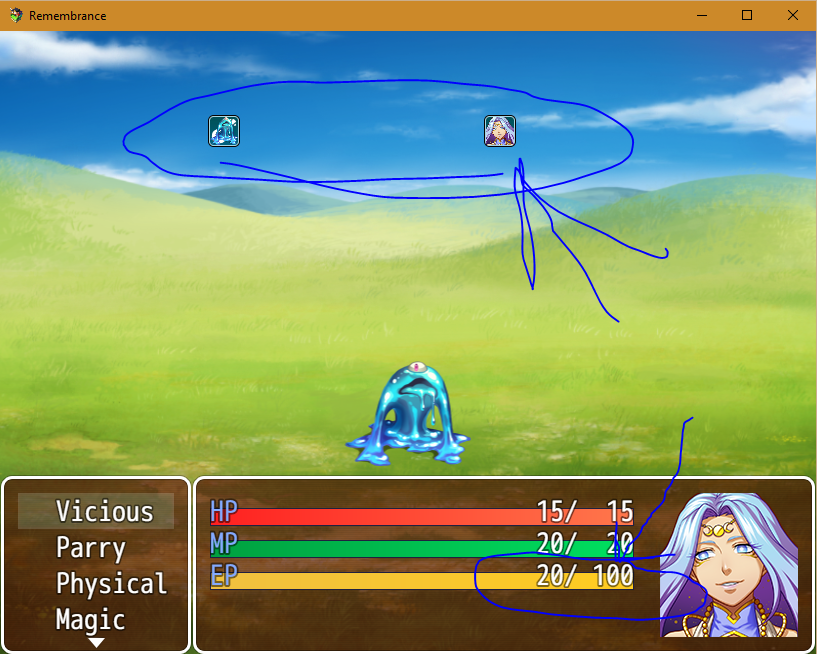
So, I recently started using some of VictorSant's plugins, mostly for aesthetics purposes (I wanted a single-actor battle HUD, and with VictorSant's plug-in allowing me to build it how I want, I figured it would work the best). Anyway, as you can see from the picture, I'm having a couple problems that I don't really know how to fix.
First, the ATB gauge is messed up. As it is, it shows the character and the slime icons racing to about the 2/3rds mark and then going back to the beginning again (the picture was right after the slime attacked and right before the actor attacked). Now, this is when I go into the parameters of the plug-in and remove the 'ATB Fileename: ATBBar' parameter. If I leave that up, the game crashes on the start of battle because I don't have the file so it tells me "Error: Failed to load: img/system/ATBBar.png" :/
I want more of an actual gauge for the ATB that just shows the actor's ATB and is positioned below the TP bar (EP in my game), which brings the other problem to attention...
The TP display is off. My character has a maximum of 20 TP (courtesy of SumRndmDde's TP Upgrade), and that value will increase as the character gains levels and gear. However, the display on the Status Menu shows a full bar (which it should be), but then it shows '20 / 100' for the actual number display. I even have '20' set as the maximum in the plug-in's parameters and it still says '20 / 100', so if anyone could tell me how to remove the maximums from the HP/MP/TP bars (think like VictorSant has on the reveal video for the plug-in), that would be greatly appreciated.
Anyway, long story short, I need help:
1) fixing the ATB gauge so it's actually a gauge and not this thing that I have currently. Chiefly I want it to be below the TP (EP) gauge and to not show the monsters' ATB charge.
2) removing the maximums from the HP, MP, and TP (EP) gauges, or find some way to ensure the maximum TP stays with the character's actual maximum (I have tried $gameActors.actor(1).mtp)
EDIT: I got the maximums removed. Now all I need is help with the ATB gauge.
Downloads / Referenced Files
Log in to download
Log in, then follow the RPG Maker Developers Group to see these download links.
If you are the original creator and want this listing reassigned, edited, or removed, join BMMPlay and contact the moderators with proof that matches the original RPG Maker Web profile, linked GitHub, itch.io page, or another public creator identity.




 NEBULA by Anker Capsule II Mini Projector
Portable Android TV projector for movie nights, gaming, and indoor or outdoor viewing.
View on Amazon
NEBULA by Anker Capsule II Mini Projector
Portable Android TV projector for movie nights, gaming, and indoor or outdoor viewing.
View on Amazon