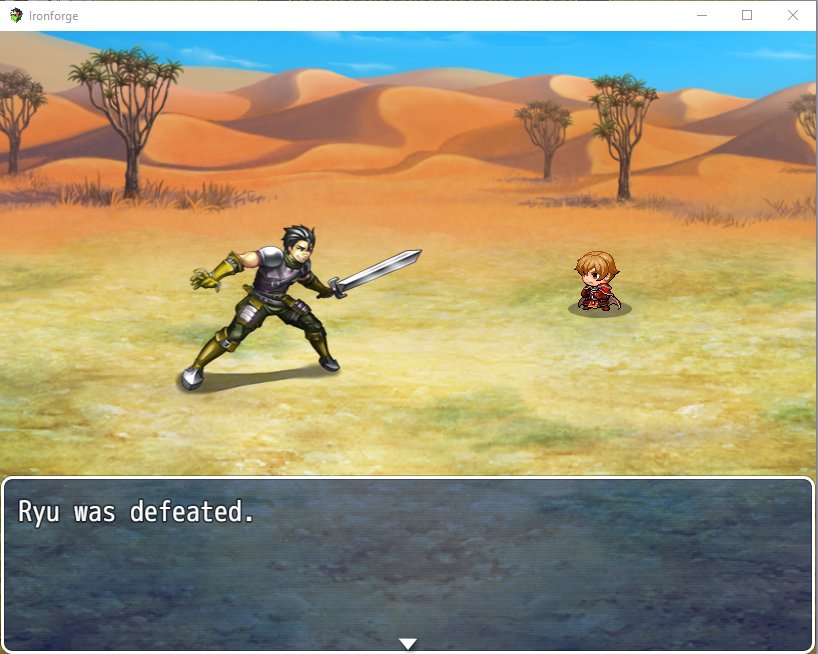
Hey guys, I recently upgrade to MV and went through the motions of converting one of my old ACE projects using this: Ace Script Converter It basically exports out all the JSON data from the game and you copy and paste it into your MV data folder. While there needed to be some adjustments, alot of my maps and events were left in tact. I've encountered one slight problem though. Any battler that once is defeated just remains frozen in spot instead of going to their faint graphic.
Hey guys, I recently upgrade to MV and went through the motions of converting one of my old ACE projects using this:
Ace Script Converter
It basically exports out all the JSON data from the game and you copy and paste it into your MV data folder.
While there needed to be some adjustments, alot of my maps and events were left in tact. I've encountered one slight problem though. Any battler that once is defeated just remains frozen in spot instead of going to their faint graphic.
See attachment
I'm assuming one of the JSON files copied over must have something to do with the glitch. Anyone know which data JSON file controls the battlers? Or w/e else might be causing the battler freeze frame? ><.
I'd really not want to have to recreate the entire game all because of one frame lol
Protected download



 PlayStation DualSense Wireless Controller - White
Extra DualSense controller for couch co-op, backup play, or PC and mobile sessions.
View on Amazon
PlayStation DualSense Wireless Controller - White
Extra DualSense controller for couch co-op, backup play, or PC and mobile sessions.
View on Amazon

