




public

Rpg Maker Developers Group

Simple enough for a child, powerful enough for a developer

2 Followers

Program-Crashing Error

BMM Archive · July 15, 2026

Preserved forum archive. This topic stores the original first post and locally mirrored RPG Maker Web attachments when available. It is posted by the BMMPlay archive account, not by the original creator.

Original Source

  • Original title: Program-Crashing Error
  • Original author: Dark Aurora
  • Original date: July 8, 2016
  • Source thread: https://forums.rpgmakerweb.com/threads/program-crashing-error.65000/
  • Source forum path: Game Development Engines > Legacy Engine Support > RPG Maker MV Support

Summary

Hello! So uh ... I came across this problem after I updated my GPU Driver. Whenever I started the program, it just crashed for no reason. Here's my spec in case you need it: (This one came from dxdiag) OS: Windows 10 Pro 64-bit (10.0, Build 10586) Processor: AMD E1-2500 APU with Radeon(TM) HD Graphics (2 CPUs) ~1.4GHz

Archived First Post

Hello! So uh ... I came across this problem after I updated my GPU Driver. Whenever I started the program, it just crashed for no reason. Here's my spec in case you need it:


(This one came from dxdiag)


OS: Windows 10 Pro 64-bit (10.0, Build 10586)
Processor: AMD E1-2500 APU with Radeon(TM) HD Graphics (2 CPUs) ~1.4GHz
GPU: AMD Radeon HD 8200 / R3 Series with 3282 MB Total Memory (Res.: 1366 x 768, 60Hz)


RAM: 6144MB RAM
DirectX: 11.3


(This one came from my GPU Driver program)


GPU Detail
GPU Driver Version: 16.5.1 (There's an update to 16.3.2 (WHQL), but everytime I updated it, the update notification persisted. I assume that this is an error from the program's side.)
Graphic Chipset: AMD Radeon HD 8200 / R3 Series
Memory Size: 520 MB
Memory Type: DDR3


Core Clock: 400 MHz
Windows Version: Windows 10 (64 bit)
System Memory: 6 GB


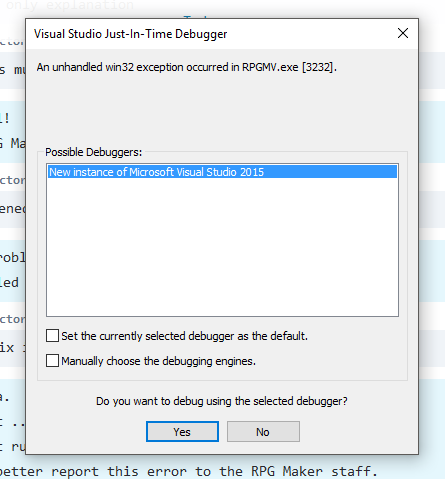
The attached picture below is the detailed problem of the crash. I pressed the "Debug" button (Since I own Microsoft Visual Studio) and give the detailed problem. The problem is "Unhandled win32 exception occurred." If you have any suggestion on how to fix this, please post down below. If this is a re-post, please give me the link to the said thread and close this thread.


Note that I bought RPG Maker MV from Steam.


Protected download

Downloads / Referenced Files

Log in to download

Log in, then follow the RPG Maker Developers Group to see these download links.

Log in to download

Referenced Images / Attachments

Error in RPG Maker MV.PNG
Creator Claims / Removal

If you are the original creator and want this listing reassigned, edited, or removed, join BMMPlay and contact the moderators with proof that matches the original RPG Maker Web profile, linked GitHub, itch.io page, or another public creator identity.

#039#rpg-maker-archive#mv-support

Replies (0)

No replies yet.

0 replies 1 view

Log in to reply.

User Avatar
