Preserved forum archive. This topic stores the original first post and locally mirrored RPG Maker Web attachments when available. It is posted by the BMMPlay archive account, not by the original creator.
Source forum path: Game Development Engines > Legacy Engine Support > RPG Maker MV Support
Summary
Alright, I don't usually come to these forums for stuff, as I usually like to figure things out / learn on my own (&/or pour through existing forums &/or Google searches for related topics), but this one has driven me so nuts that I've resorted to creating an account on this forum JUST to ask the community "what the heck is going on?". It seems like it should be a simple process, & I don't remember running into this problem on VXA; & fyi, I've been toying with the RPG...
Alright, I don't usually come to these forums for stuff, as I usually like to figure things out / learn on my own (&/or pour through existing forums &/or Google searches for related topics), but this one has driven me so nuts that I've resorted to creating an account on this forum JUST to ask the community "what the heck is going on?".
It seems like it should be a simple process, & I don't remember running into this problem on VXA; & fyi, I've been toying with the RPG Maker series for a while, & have SOME scripting knowledge, so feel free to use more technical terms if you like. This isn't my first rodeo, lol.
So here's my problem...
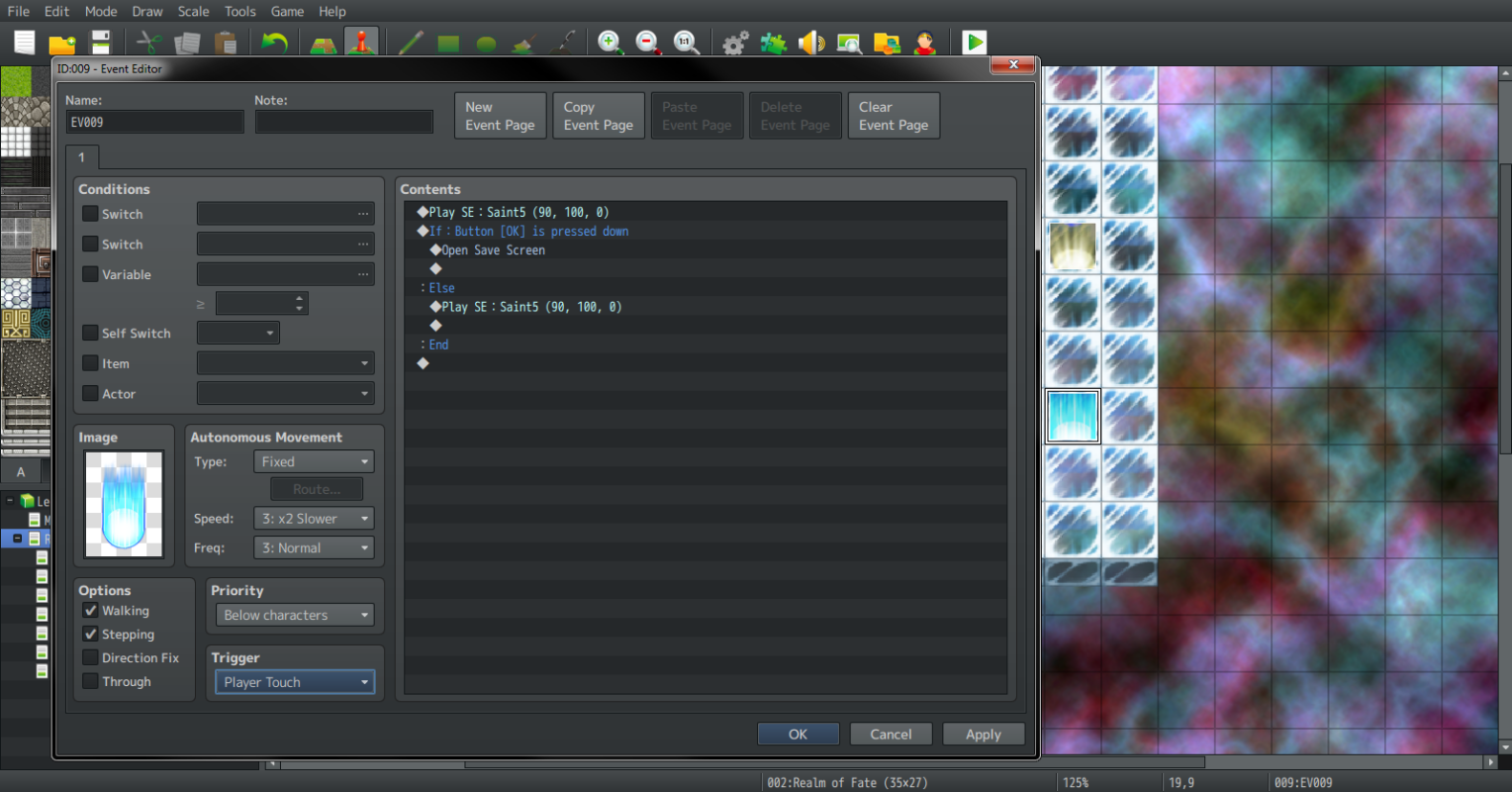
As you can see from the attached image, I'm trying to create a "simple" save point, where it will create a "chime" effect when a player passes across it (i.e. "on touch"). The save screen should ONLY open if the player hits the "OK" button (i.e. the conditional branch). Now.......... I've tried this just about every way you can imagine; from creating multiple event pages, linking the event to trigger fires (i.e. switches &/or variables), & creating a mass of other scenarios, & the freakin' thing just won't work. Yeah, I can get the event to "chime on touch", like it's supposed to do, but the freakin' thing just won't open the save menu (even if it's set similarly to a parallel event). The ONLY way I've been able to get this scenario to work is by setting the event to the same level as the characters... but that kind-of defeats the purpose of the effect it's supposed to have. It feels like I'm over-thinking this (or, that it should be a LOT simpler), but for the life of me, I just can't seem to figure it out. SMH
Any thoughts? (thx in advance)
Protected download
Downloads / Referenced Files
Log in to download
Log in, then follow the RPG Maker Developers Group to see these download links.
If you are the original creator and want this listing reassigned, edited, or removed, join BMMPlay and contact the moderators with proof that matches the original RPG Maker Web profile, linked GitHub, itch.io page, or another public creator identity.






 Pulsar X2 Crazylight Wireless Gaming Mouse
Ultra-light wireless gaming mouse for quick aim, claw grip, and fingertip control.
View on Amazon
Pulsar X2 Crazylight Wireless Gaming Mouse
Ultra-light wireless gaming mouse for quick aim, claw grip, and fingertip control.
View on Amazon