




public

Rpg Maker Developers Group

Simple enough for a child, powerful enough for a developer

2 Followers

Shrinking the character and increasing the size of tiles to make the world appear bigger.

BMM Archive · July 15, 2026

Preserved forum archive. This topic stores the original first post and locally mirrored RPG Maker Web attachments when available. It is posted by the BMMPlay archive account, not by the original creator.

Original Source

  • Original title: Shrinking the character and increasing the size of tiles to make the world appear bigger.
  • Original author: Kip
  • Original date: June 2, 2016
  • Source thread: https://forums.rpgmakerweb.com/threads/shrinking-the-character-and-increasing-the-size-of-tiles-to-make-the-world-appear-bigger.62891/
  • Source forum path: Game Development Engines > Legacy Engine Support > RPG Maker MV Support

Summary

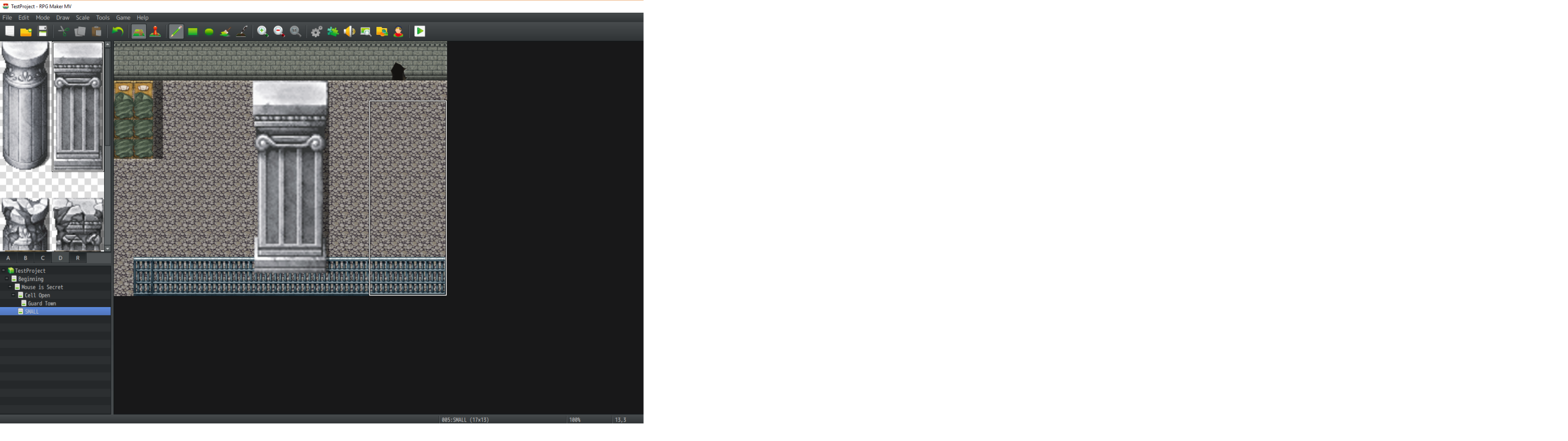
Hey everyone. I have a question that google can't seem to help me find the answer to You see, I'm making my vier first RPG maker game using MV and I have a mechanic where the player can cast a spell to make themselves 4 times smaller. (allows them to fit through tiny holes and what not) But here's the thing. I don't want to shrink down my character's walking sprite. Instead I want to scale the world's tiles UP.  Here's an example:

Archived First Post

Hey everyone. I have a question that google can't seem to help me find the answer to


You see, I'm making my vier first RPG maker game using MV and I have a mechanic where the player can cast a spell to make themselves 4 times smaller. (allows them to fit through tiny holes and what not)


But here's the thing. I don't want to shrink down my character's walking sprite. Instead I want to scale the world's tiles UP. 


Here's an example:
The bed tileset consists of 2 tiles normally. One top tile for the top of the bed, and one bottom tile for the bottom. It is 1x2 (one across, two down)


If I had my way, I would put the tilesheet into photoshop and scale it up by 400% and paste it back in. Hypothetically that would make the same bed a little pixelated of course, but also that bed would now be 4x8 (the top being 4 tiles across and the bed going 8 tiles down)


Problem is when I try this, going into the tile selection tab, most of the tiles are cut off and I can only see the first two objects on the page...does anyone have any ideas for me?

Protected download

Downloads / Referenced Files

Log in to download

Log in, then follow the RPG Maker Developers Group to see these download links.

Log in to download

Referenced Images / Attachments

example.png
example.png
Creator Claims / Removal

If you are the original creator and want this listing reassigned, edited, or removed, join BMMPlay and contact the moderators with proof that matches the original RPG Maker Web profile, linked GitHub, itch.io page, or another public creator identity.

#039#rpg-maker-archive#mv-support

Replies (0)

No replies yet.

0 replies 1 view

Log in to reply.

User Avatar

