






public

Rpg Maker Developers Group

Simple enough for a child, powerful enough for a developer

2 Followers

RPG Maker MV Title Screen Text Editing

BMM Archive · July 15, 2026

Preserved forum archive. This topic stores the original first post and locally mirrored RPG Maker Web attachments when available. It is posted by the BMMPlay archive account, not by the original creator.

Original Source

  • Original title: RPG Maker MV Title Screen Text Editing
  • Original author: Hitman26
  • Original date: November 9, 2015
  • Source thread: https://forums.rpgmakerweb.com/threads/rpg-maker-mv-title-screen-text-editing.49988/
  • Source forum path: Game Development Engines > Legacy Engine Support > RPG Maker MV Support

Summary

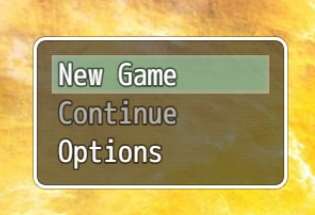
Excuse me, I know how to do this in RPGMaker Ace but not MV. How do you edit the text like load, continue, settings on the start screen? When I open up the scenes config I'm not finding the options anywhere so could anyone give me like a picture tutorial please? Thanks! If you need more info here's a picture of what I'm attempting to change. And here's a second question. How would I change the position of the text and the window opacity? I've looked everywhere on the forums...

Archived First Post

Excuse me, I know how to do this in RPGMaker Ace but not MV. How do you edit the text like load, continue, settings on the start screen?

When I open up the scenes config I'm not finding the options anywhere so could anyone give me like a picture tutorial please? Thanks!

If you need more info here's a picture of what I'm attempting to change. And here's a second question. How would I change the position of the text and the window opacity? I've looked everywhere on the forums but can't find any help for MV.

Protected download

Downloads / Referenced Files

Log in to download

Log in, then follow the RPG Maker Developers Group to see these download links.

Log in to download

Referenced Images / Attachments

oie_AY9fg4yJS5z9.png
Creator Claims / Removal

If you are the original creator and want this listing reassigned, edited, or removed, join BMMPlay and contact the moderators with proof that matches the original RPG Maker Web profile, linked GitHub, itch.io page, or another public creator identity.

#039#rpg-maker-archive#mv-support

Replies (0)

No replies yet.

0 replies 1 view

Log in to reply.

User Avatar