
Original Source
- Original title: Sprite collision (change size of bounding box?)
- Original author: ashikai
- Original date: May 14, 2016
- Source thread: https://forums.rpgmakerweb.com/threads/sprite-collision-change-size-of-bounding-box.61865/
- Source forum path: Game Development Engines > Legacy Engine Support > RPG Maker MV Support
Summary
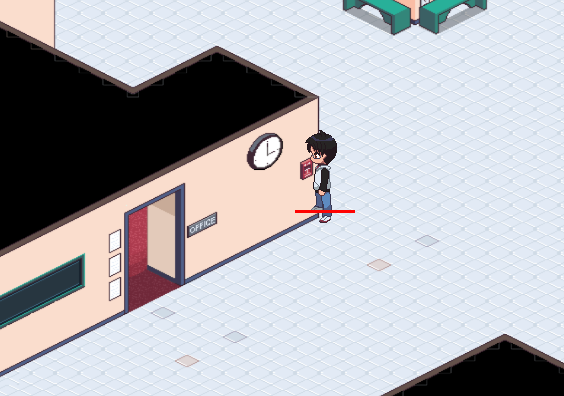
I know I'm working a bit outside of the general MV standards, but I've come across and interesting issue that I'm not sure how to approach. Using the TileD plugin, I'm making everything based off of a 12x12px grid. My sprites are 5x8 tiles each (so 60 x 96 px). If you look at the image below you can see the sprite overlaying on top of a wall. The red line is a visual representation of how wide the whole sprite SHOULD be and where the collision should really take...
Archived First Post
Using the TileD plugin, I'm making everything based off of a 12x12px grid. My sprites are 5x8 tiles each (so 60 x 96 px). If you look at the image below you can see the sprite overlaying on top of a wall. The red line is a visual representation of how wide the whole sprite SHOULD be and where the collision should really take place.
I've looked into this a bit and I guess no matter what size your sprite is, the collision box is only the hxw of MV's default tile size (so 48px). Is there a way to adjust this width?
Protected download
Downloads / Referenced Files
Log in, then follow the RPG Maker Developers Group to see these download links.
Log in to downloadReferenced Images / Attachments
Creator Claims / Removal
If you are the original creator and want this listing reassigned, edited, or removed, join BMMPlay and contact the moderators with proof that matches the original RPG Maker Web profile, linked GitHub, itch.io page, or another public creator identity.
Replies (0)
No replies yet.
Topic Summary
Loading summary...