

Conditional branch doing both things
BMM_Archive · July 15, 2026

BMM_Archive
Preserved forum archive. This topic stores the original first post and locally mirrored RPG Maker Web attachments when available. It is posted by the BMMPlay archive account, not by the original creator.
Original Source
- Original title: Conditional branch doing both things
- Original author: mashpotato
- Original date: May 8, 2016
- Source thread: https://forums.rpgmakerweb.com/threads/conditional-branch-doing-both-things.61581/
- Source forum path: Game Development Engines > Legacy Engine Support > RPG Maker MV Support
Summary
I have made a slider game where you have to stop a slider over the max button { "lightbox_close": "Close", "lightbox_next": "Next",
Archived First Post
I have made a slider game where you have to stop a slider over the max button

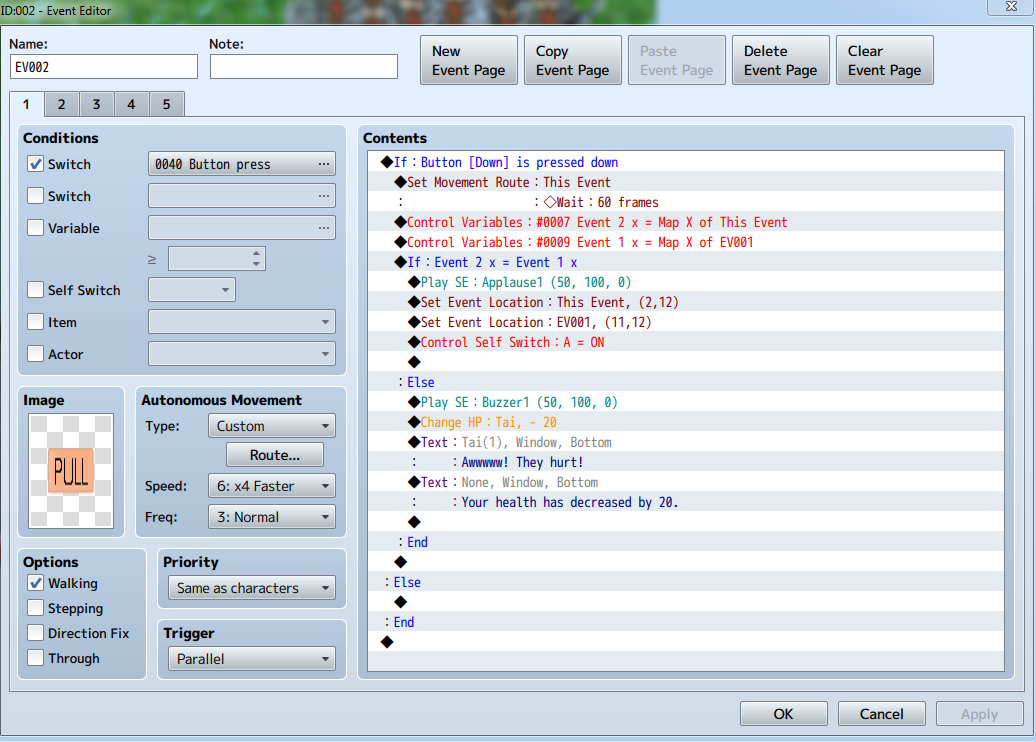
But i'm having trouble with the conditional branch that decides if you stopped it in the correct place. If you stop it correctly the pull slider should move faster but if you don't you hear a buzzer and take 20 damage. Instead my event is doing both these things at the same time. The second else branch is blank as I don't want it to do anything if you are not pressing the down key. (the conditional variables did originally check the y coordinates as well but as it only ever moves side ways so i removed them, but the problem still existed when they were there.) Each event page is the same just moving the slider faster and changing its and the max events position.
Thanks to anyone that came help me solve it, it is probably something really simply I've missed.
But i'm having trouble with the conditional branch that decides if you stopped it in the correct place. If you stop it correctly the pull slider should move faster but if you don't you hear a buzzer and take 20 damage. Instead my event is doing both these things at the same time. The second else branch is blank as I don't want it to do anything if you are not pressing the down key. (the conditional variables did originally check the y coordinates as well but as it only ever moves side ways so i removed them, but the problem still existed when they were there.) Each event page is the same just moving the slider faster and changing its and the max events position.
Thanks to anyone that came help me solve it, it is probably something really simply I've missed.
Downloads / Referenced Files
RPG Maker Web attachments are mirrored locally when available. Other external links remain hosted by their original creator or third-party service.
- Local mirror: 22469-69983e1255aa79b7f7f615ea37b3ba2d.png
SHA-256:abd7c5b3e9faa2cfcf66fef6b17dc2433c719f06b1ce378416f740f171d06933
Original attachment URL: https://forums.rpgmakerweb.com/attachments/pic16-png.37744/ - Local mirror: 22468-6070cf5f2f5f82f018fb7f8fd3d9d594.png
SHA-256:1f8cf7236ccc142c8f8002e54e1ef33fadfd718b234dcf6afb630e5ce8b7ed58
Original attachment URL: https://forums.rpgmakerweb.com/attachments/pic15-png.37743/
Referenced Images / Attachments
Creator Claims / Removal
If you are the original creator and want this listing reassigned, edited, or removed, join BMMPlay and contact the moderators with proof that matches the original RPG Maker Web profile, linked GitHub, itch.io page, or another public creator identity.
Replies (0)
No replies yet.
0
replies
12
views
Topic Summary
Loading summary...