

Yanfly BattleAICore plugin help
BMM_Archive · July 15, 2026

Original Source
- Original title: Yanfly BattleAICore plugin help
- Original author: carpg123
- Original date: May 3, 2016
- Source thread: https://forums.rpgmakerweb.com/threads/yanfly-battleaicore-plugin-help.61295/
- Source forum path: Game Development Engines > Legacy Engine Support > RPG Maker MV Support
Summary
Hello, this is probably a silly question, but I cannot seem to get this plugin to work: http://yanfly.moe/2015/10/10/yep-3-battle-engine-core/ I've downloaded some of his other plugins and they all work fine, but I'm having trouble activating this battle core plugin. I've even turned off all other plugins and moved this one to the top of the list and still nothing happens. My enemies do not move when making an attack, the select skill screen still takes up the entire screen, redundant battle messages are still being played, etc. Basically everything is...
Archived First Post
I've downloaded some of his other plugins and they all work fine, but I'm having trouble activating this battle core plugin. I've even turned off all other plugins and moved this one to the top of the list and still nothing happens. My enemies do not move when making an attack, the select skill screen still takes up the entire screen, redundant battle messages are still being played, etc. Basically everything is still the default system.
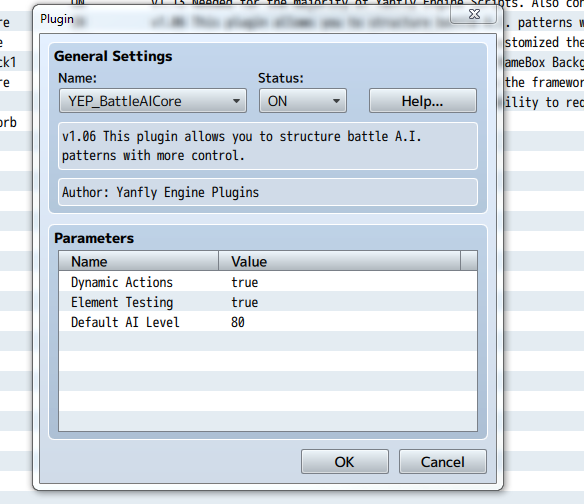
I attached a screenshot of the plugin settings that I see:
EDIT : Nevermind, I figured it out. This isn't even the right plugin - I don't know what I'm thinking, a very silly mistake >_<
Thanks in advance!
Downloads / Referenced Files
RPG Maker Web attachments are mirrored locally when available. Other external links remain hosted by their original creator or third-party service.
- Local mirror: 22231-002e60be63a93b6ddc3fcd8ed564fe1c.png
SHA-256:6e2798fe5f4394aa8ea777cb48d94affef596090ed6cf1fd4b6d1f6e92c60cda
Original attachment URL: https://forums.rpgmakerweb.com/attachments/capture-png.37417/
Referenced Images / Attachments
Creator Claims / Removal
If you are the original creator and want this listing reassigned, edited, or removed, join BMMPlay and contact the moderators with proof that matches the original RPG Maker Web profile, linked GitHub, itch.io page, or another public creator identity.
Replies (0)
No replies yet.
Topic Summary
Loading summary...