Preserved forum archive. This topic stores the original first post and locally mirrored RPG Maker Web attachments when available. It is posted by the BMMPlay archive account, not by the original creator.
Original Source
Original title: My battle-menu isn't working properly
Source forum path: Game Development Engines > Legacy Engine Support > RPG Maker MV Support
Summary
Hello, first, I hope I didn't open this thread into the wrong section and I hope there isn't another similar topic since I've searched for hours. ^^' Also, since I'm french, I'll give the french names of the menus and I'm really sorry if my english isn't really good. Here we go:
Archived First Post
Hello,
first, I hope I didn't open this thread into the wrong section and I hope there isn't another similar topic since I've searched for hours. ^^'
Also, since I'm french, I'll give the french names of the menus and I'm really sorry if my english isn't really good.
Here we go:
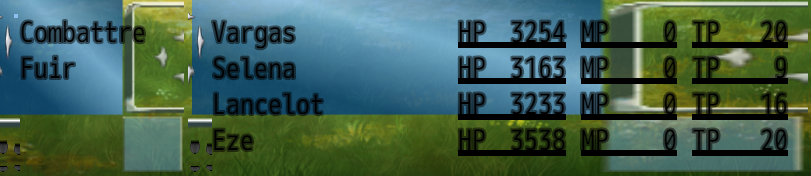
Since I didn't work on the hero's skills until now, I never tried to test them into a battle so I went into the 'Troupes' menu.
Then I click on 'Test de Combat' (or maybe 'Fight Test' for english people).
I don't change the default setting of the fight, except the caracters I want to test, then I begin the fight.
And then, I immediatly see a glitched battle menu.
At first, I was thinking of a bad picture format for the file 'Window.png', then after I created a copy of it, I try with another skin I found on the forum, same result.
In fact, regardless of wich skin I use, in the final, I'll have the same black font and the same glitchy visual.
On the other hand, the item window is working perfectly.
I have to say that even if the window looks like.... this, it's working normally and the battle ins't affected.
I hope someone has an answer, it would be great. ^^'
Protected download
Downloads / Referenced Files
Log in to download
Log in, then follow the RPG Maker Developers Group to see these download links.
If you are the original creator and want this listing reassigned, edited, or removed, join BMMPlay and contact the moderators with proof that matches the original RPG Maker Web profile, linked GitHub, itch.io page, or another public creator identity.






 Keychron K2 QMK Wireless Mechanical Gaming Keyboard
Compact wireless mechanical keyboard for office work, gaming, and desk upgrades.
View on Amazon
Keychron K2 QMK Wireless Mechanical Gaming Keyboard
Compact wireless mechanical keyboard for office work, gaming, and desk upgrades.
View on Amazon