


Graphic won't show up
BMM_Archive · July 15, 2026

Original Source
- Original title: Graphic won't show up
- Original author: CornFlakes
- Original date: May 28, 2016
- Source thread: https://forums.rpgmakerweb.com/threads/graphic-wont-show-up.62508/
- Source forum path: Game Development Engines > Legacy Engine Support > RPG Maker VXAce Support
Summary
So, I'm a complete noob about rpg makers and whatnot but I got the gist of it after watching a few tutorials. It's only now that I got serious about making a game, so I kinda need other peoples help on specific stuff that I'm stuck in.The game I'm making is kind of similar to horror games like Ib or mad father but with rpg fantasy fights included. So, I want to make this short event where its for the sake of scaring the player by making a mouse appear out of nowhere. This...
Archived First Post
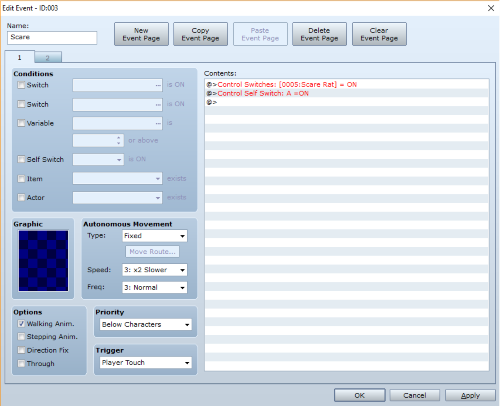
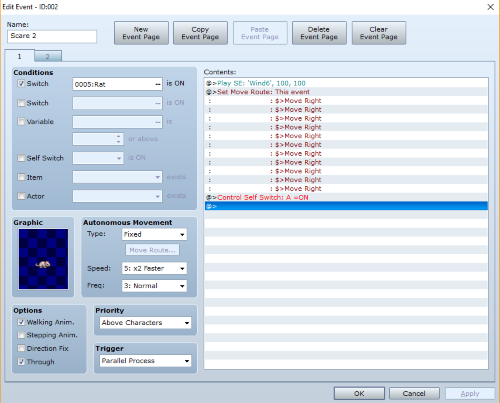
So, I want to make this short event where its for the sake of scaring the player by making a mouse appear out of nowhere. This is what I did, I made two events. The first one is a Player touch trigger, once that event is touched, it activates a switch for the second event(Parallel Process) which is where the mouse is placed and then moves fast and past through the player. My problem is, the graphic for the mouse won't show up and I wanna know what I did wrong.
Protected download
Protected download
Downloads / Referenced Files
Log in, then follow the RPG Maker Developers Group to see these download links.
Log in to downloadReferenced Images / Attachments
Creator Claims / Removal
If you are the original creator and want this listing reassigned, edited, or removed, join BMMPlay and contact the moderators with proof that matches the original RPG Maker Web profile, linked GitHub, itch.io page, or another public creator identity.
Replies (0)
No replies yet.
Topic Summary
Loading summary...

