


Animated sprites problem
BMM_Archive · July 15, 2026

Preserved forum archive. This topic stores the original first post and locally mirrored RPG Maker Web attachments when available. It is posted by the BMMPlay archive account, not by the original creator.
Original Source
- Original title: Animated sprites problem
- Original author: Dark_Metamorphosis
- Original date: May 20, 2016
- Source thread: https://forums.rpgmakerweb.com/threads/animated-sprites-problem.62122/
- Source forum path: Game Development Engines > Legacy Engine Support > RPG Maker VXAce Support
Summary
So I have tried (yep tried is the right word) to make an animation sheet where a general puts on his helmet before a boss battle. The problem I have with this is first of all: When I put the move route inside the event: Speed: x2 slower Frequency: Lowest
Archived First Post
So I have tried (yep tried is the right word) to make an animation sheet where a general puts on his helmet before a boss battle.
The problem I have with this is first of all: When I put the move route inside the event:
Speed: x2 slower
Frequency: Lowest
Turn Left
wait 4 frames
Turn Right
wait 4 frames
It only shows column 1-3 and not 4 (I used the same movement for treasure chest opening since it uses all 12 sprite animations). I remember that I figured out how to use each column, maybe it was down, left, right, up or something but if anyone could give me a suggestion on how to use all 12 of the images it would be cool.
My second problem is that I cant control the event in question with an auto run, if I change the graphics, the speed and the frequency to the event in question it will not show in the same fashion as it does if I put it in the move route inside the event itself. I know that I have been able to use all columns before (but I forgot the turn order), but I have never tried to implement it from an auto-run.
I hope I'm clear in what I mean.
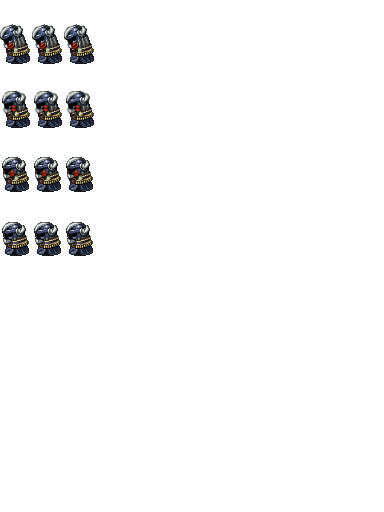
Here's the "animation" Im trying to implement:
Protected download
The problem I have with this is first of all: When I put the move route inside the event:
Speed: x2 slower
Frequency: Lowest
Turn Left
wait 4 frames
Turn Right
wait 4 frames
It only shows column 1-3 and not 4 (I used the same movement for treasure chest opening since it uses all 12 sprite animations). I remember that I figured out how to use each column, maybe it was down, left, right, up or something but if anyone could give me a suggestion on how to use all 12 of the images it would be cool.
My second problem is that I cant control the event in question with an auto run, if I change the graphics, the speed and the frequency to the event in question it will not show in the same fashion as it does if I put it in the move route inside the event itself. I know that I have been able to use all columns before (but I forgot the turn order), but I have never tried to implement it from an auto-run.
I hope I'm clear in what I mean.
Here's the "animation" Im trying to implement:
Protected download
Downloads / Referenced Files
Log in to download
Log in, then follow the RPG Maker Developers Group to see these download links.
Log in to downloadReferenced Images / Attachments
Creator Claims / Removal
If you are the original creator and want this listing reassigned, edited, or removed, join BMMPlay and contact the moderators with proof that matches the original RPG Maker Web profile, linked GitHub, itch.io page, or another public creator identity.
Replies (0)
No replies yet.
0
replies
9
views
Topic Summary
Loading summary...

