

Turning off the smoothing in MV
BMM_Archive · July 15, 2026

Original Source
- Original title: Turning off the smoothing in MV
- Original author: Hatake-hime
- Original date: March 28, 2016
- Source thread: https://forums.rpgmakerweb.com/threads/turning-off-the-smoothing-in-mv.59526/
- Source forum path: Game Development Engines > Legacy Engine Support > RPG Maker MV Support
Summary
I want to disable the smoothing that is making my pixels smooth. I am using YEP_CoreEngine to change my resolution to match the parallexes, but my parallexes are still blurred. I have put: ImageManager.loadBitmap = function(folder, filename, hue, smooth) { if (filename) { var path = folder + encodeURIComponent(filename) + '.png'; var bitmap = this.loadNormalBitmap(path, hue || ); //console.log("disabling smoothing for "+path); bitmap.smooth = false; return bitmap; } else { return this.loadEmptyBitmap(); }}; Click to expand...
Archived First Post
I have put:
ImageManager.loadBitmap = function(folder, filename, hue, smooth) { if (filename) { var path = folder + encodeURIComponent(filename) + '.png'; var bitmap = this.loadNormalBitmap(path, hue || ); //console.log("disabling smoothing for "+path); bitmap.smooth = false; return bitmap; } else { return this.loadEmptyBitmap(); }};
into my game as a plugin, as well as added
<style type="text/css"> CANVAS{image-rendering: pixelated;}</style>
to my index.html at the end near </head> and between the <body>.
I have tried all the above, and still my pixels are blurry. ((I don't know what it means by or where to put)
PIXI.scaleModes.DEFAULT = PIXI.scaleModes.NEAREST;
Please help, I can't make any games..?
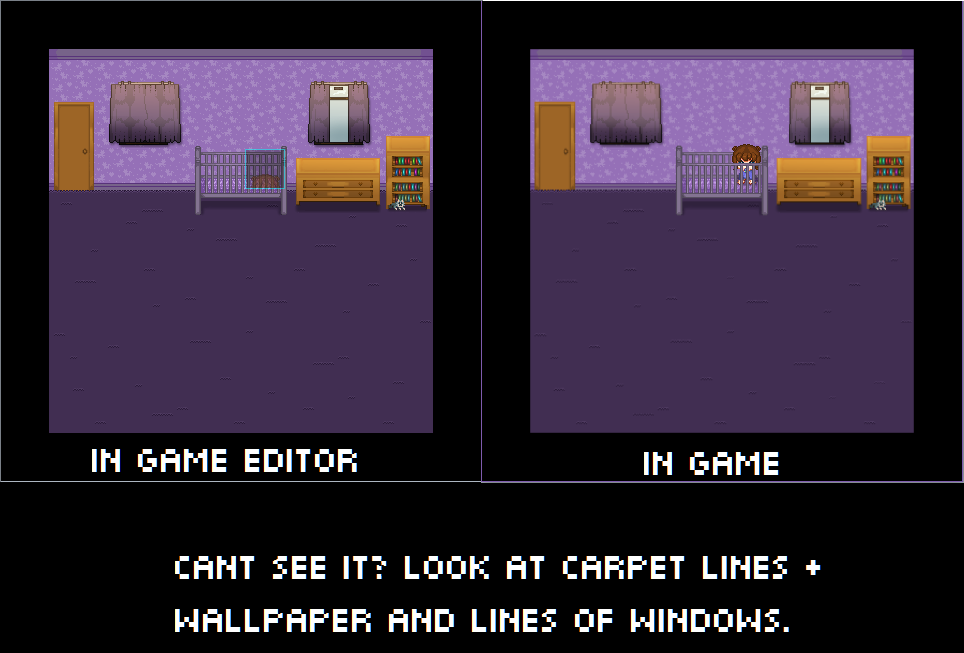
I am including an example of the blurring I mean. Please full view it to see the difference.
Downloads / Referenced Files
RPG Maker Web attachments are mirrored locally when available. Other external links remain hosted by their original creator or third-party service.
- Local mirror: 20411-84dca20ff7eb6690d1611dea82423d43.png
SHA-256:9e83019205bc6caeb31a2162129d74c78d9ed47d776c754b5c5b598e25c5f959
Original attachment URL: https://forums.rpgmakerweb.com/attachments/baby-png.34776/
Referenced Images / Attachments
Creator Claims / Removal
If you are the original creator and want this listing reassigned, edited, or removed, join BMMPlay and contact the moderators with proof that matches the original RPG Maker Web profile, linked GitHub, itch.io page, or another public creator identity.
Replies (0)
No replies yet.
Topic Summary
Loading summary...