Preserved forum archive. This topic stores the original first post and locally mirrored RPG Maker Web attachments when available. It is posted by the BMMPlay archive account, not by the original creator.
Original Source
Original title: How do I make the text box transparent?
Source forum path: Game Development Engines > Legacy Engine Support > RPG Maker MV Support
Summary
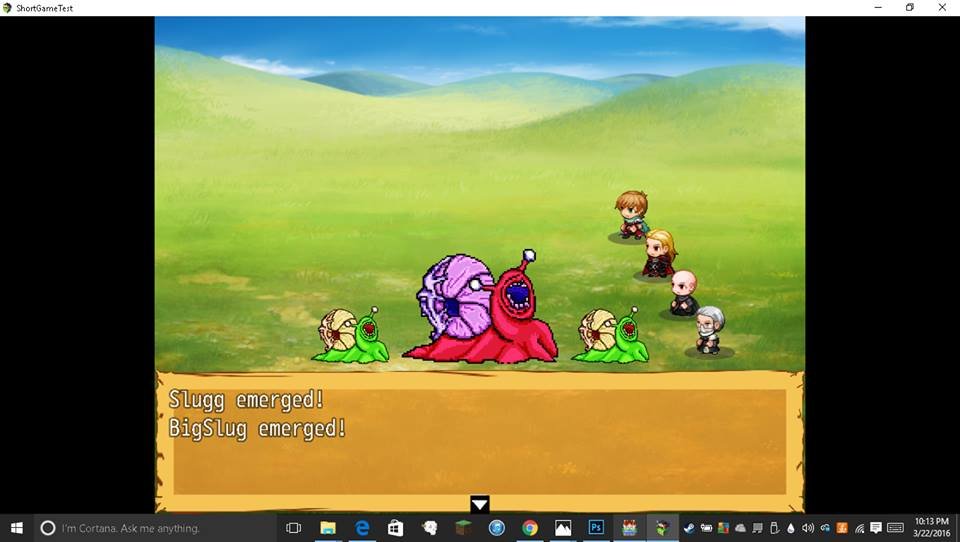
Hello everyone, I'm attempting to make a Lovecraftian RPG, with all art assets done by me. Here you can see an enemy sprite I created, but I am also trying to change the dialogue boxes. Here I am trying to make it look like a torn page from an old book (It's basic and ugly at the moment). Problem is, I get this semi-opaque colored background, and I don't think I can change this by editing graphics in photoshop alone, I THINK I have to go into the games code,...
Archived First Post
Hello everyone, I'm attempting to make a Lovecraftian RPG, with all art assets done by me. Here you can see an enemy sprite I created, but I am also trying to change the dialogue boxes. Here I am trying to make it look like a torn page from an old book (It's basic and ugly at the moment). Problem is, I get this semi-opaque colored background, and I don't think I can change this by editing graphics in photoshop alone, I THINK I have to go into the games code, sadly, I don't really know code, and would like some help, thank you!
Protected download
Downloads / Referenced Files
Log in to download
Log in, then follow the RPG Maker Developers Group to see these download links.
If you are the original creator and want this listing reassigned, edited, or removed, join BMMPlay and contact the moderators with proof that matches the original RPG Maker Web profile, linked GitHub, itch.io page, or another public creator identity.






 UGREEN Nexode 200W GaN USB-C Wall Charger
High-output four-port USB-C charger for laptops, tablets, phones, and travel kits.
View on Amazon
UGREEN Nexode 200W GaN USB-C Wall Charger
High-output four-port USB-C charger for laptops, tablets, phones, and travel kits.
View on Amazon