Preserved forum archive. This topic stores the original first post and locally mirrored RPG Maker Web attachments when available. It is posted by the BMMPlay archive account, not by the original creator.
Source forum path: Game Development Engines > Legacy Engine Support > RPG Maker VXAce Support
Summary
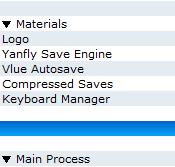
So when I was adding the YanFly Ace Save Engine, HimeWork's Compressed Save Files, and Vlue's Autosave, I found out that the order they were in made Continue impossible, so I could only click on New Game and Shut Down. However, when I cut-and-pasted the scripts in the order of YanFly, Vlue, and HimeWorks, I found that the scripts now allowed me to use Continue. So, for those wondering, you gotta put YanFly's script above other save-related scripts. { "lightbox_close": "Close", "lightbox_next": "Next",
Archived First Post
So when I was adding the YanFly Ace Save Engine, HimeWork's Compressed Save Files, and Vlue's Autosave, I found out that the order they were in made Continue impossible, so I could only click on New Game and Shut Down. However, when I cut-and-pasted the scripts in the order of YanFly, Vlue, and HimeWorks, I found that the scripts now allowed me to use Continue. So, for those wondering, you gotta put YanFly's script above other save-related scripts.
Protected download
Downloads / Referenced Files
Log in to download
Log in, then follow the RPG Maker Developers Group to see these download links.
If you are the original creator and want this listing reassigned, edited, or removed, join BMMPlay and contact the moderators with proof that matches the original RPG Maker Web profile, linked GitHub, itch.io page, or another public creator identity.




 ProtoArc EM11 Wireless Bluetooth Vertical Mouse
Vertical ergonomic mouse for long desk sessions and reduced wrist strain.
View on Amazon
ProtoArc EM11 Wireless Bluetooth Vertical Mouse
Vertical ergonomic mouse for long desk sessions and reduced wrist strain.
View on Amazon