

Event not responding
BMM_Archive · July 15, 2026

Original Source
- Original title: Event not responding
- Original author: jvashko
- Original date: March 21, 2016
- Source thread: https://forums.rpgmakerweb.com/threads/event-not-responding.59061/
- Source forum path: Game Development Engines > Legacy Engine Support > RPG Maker MV Support
Summary
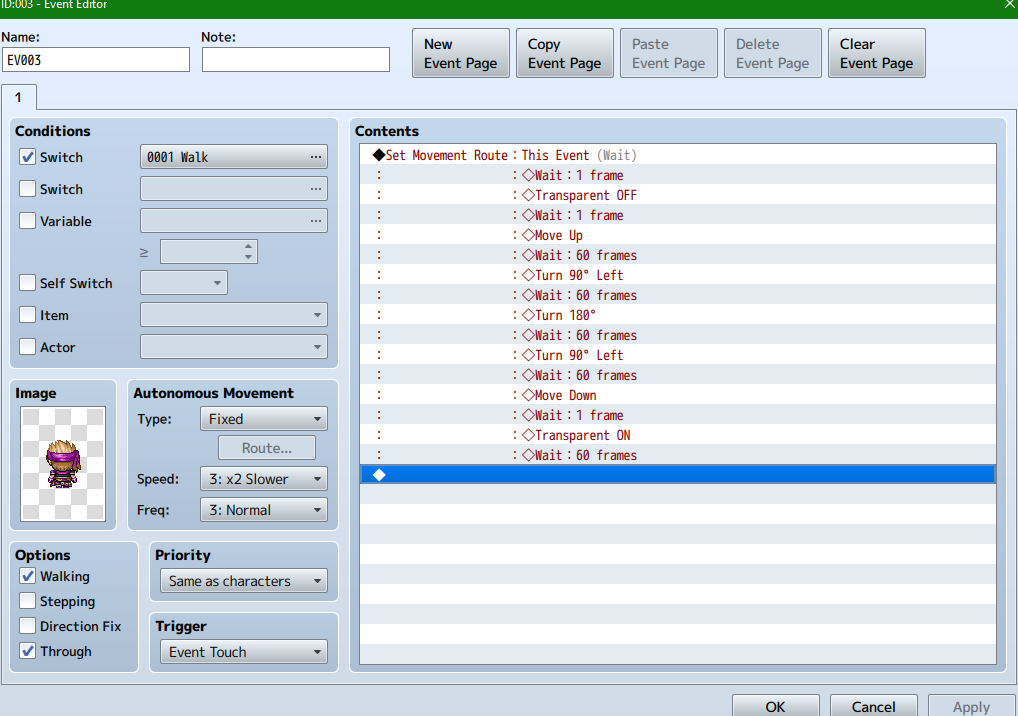
Basically, I figured out how to use switches based on a guide by the lovely Uncle Despain. But when I set the switch to activate this dude (who I want to appear and turn his head a couple times), the larger chunk of the event commands do not occur. After the Transparency=OFF command, the sprite does not move forward, or react at all. Every piece of information I have is in the attached image, except for the switch itself (from another event, seems to be no issues with the two...
Archived First Post
Any help would be much appreciated.
Thanks,
-jvashko
Downloads / Referenced Files
RPG Maker Web attachments are mirrored locally when available. Other external links remain hosted by their original creator or third-party service.
- Local mirror: 19905-effd20141212ec659e591e6c61aec0c8.png
SHA-256:a58f49a3f1b04117bcff17eaadc688e1b3867fc0b97b9efb96b841d4c09727af
Original attachment URL: https://forums.rpgmakerweb.com/attachments/screenshot-9-png.33970/
Referenced Images / Attachments
Creator Claims / Removal
If you are the original creator and want this listing reassigned, edited, or removed, join BMMPlay and contact the moderators with proof that matches the original RPG Maker Web profile, linked GitHub, itch.io page, or another public creator identity.
Replies (0)
No replies yet.
Topic Summary
Loading summary...