Original Source
- Original title: Fading out a sprite/image
- Original author: jvashko
- Original date: March 19, 2016
- Source thread: https://forums.rpgmakerweb.com/threads/fading-out-a-sprite-image.58991/
- Source forum path: Game Development Engines > Legacy Engine Support > RPG Maker MV Support
Summary
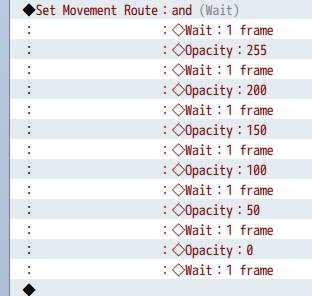
Yet again, I'm having problems with this event. In my previous question I asked about having cracks appear in the ground. Now I'm trying to make aforementioned sprite fall into this crack using a "change opacity" movement route. Is there something I'm doing wrong? Did I leave a command out? Is there an easier way to accomplish this that I'm overlooking? When I playtest the game, the rest of the event runs fine, but when it gets to this, nothing happens. Any help, no matter how complicated, is appreciated. Thanks,...
Archived First Post
Is there something I'm doing wrong? Did I leave a command out? Is there an easier way to accomplish this that I'm overlooking? When I playtest the game, the rest of the event runs fine, but when it gets to this, nothing happens. Any help, no matter how complicated, is appreciated.
Thanks,
-jvashko
Protected download
EDIT: the "and" next to (Wait) is the name of the event.
Downloads / Referenced Files
Log in, then follow the RPG Maker Developers Group to see these download links.
Log in to downloadReferenced Images / Attachments
Creator Claims / Removal
If you are the original creator and want this listing reassigned, edited, or removed, join BMMPlay and contact the moderators with proof that matches the original RPG Maker Web profile, linked GitHub, itch.io page, or another public creator identity.
Replies (0)
No replies yet.
Topic Summary
Loading summary...