


[RMMV] Tileset Passable tiles
BMM_Archive · July 15, 2026

Original Source
- Original title: [RMMV] Tileset Passable tiles
- Original author: Omar
- Original date: February 21, 2016
- Source thread: https://forums.rpgmakerweb.com/threads/rmmv-tileset-passable-tiles.57294/
- Source forum path: Game Development Engines > Legacy Engine Support > RPG Maker MV Support
Summary
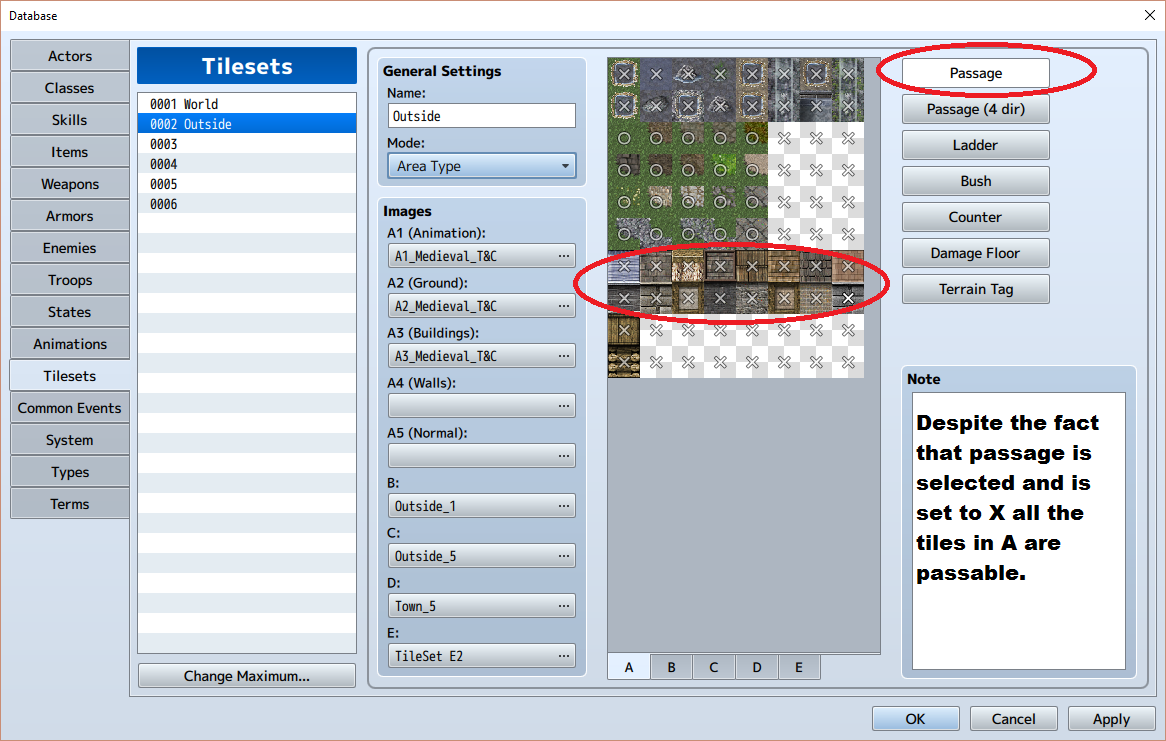
I imported some of my titles, built my scene. Sat back and enjoyed the beautiful artwork. Then it came time to do the task of marking all the tiles as passable or not. So I opened up system, go to passage, and mark everything 0 or X for tile A (B-E there are some bushes, trees, fences and so they have a mix of what is set and not set. Everything works great. Except tileset A. Now my builds as shown in the picture below are set to X so...


Archived First Post
Now my builds as shown in the picture below are set to X so I should not be able to walk on them. Yet I can walk all over them. I suppose I could have done something wrong and I am hoping for a quick, you did this wrong so I can get back to the game building. Thank you in advance for your help.
Protected download
Downloads / Referenced Files
Log in, then follow the RPG Maker Developers Group to see these download links.
Log in to downloadReferenced Images / Attachments
Creator Claims / Removal
If you are the original creator and want this listing reassigned, edited, or removed, join BMMPlay and contact the moderators with proof that matches the original RPG Maker Web profile, linked GitHub, itch.io page, or another public creator identity.
Replies (0)
No replies yet.
Topic Summary
Loading summary...
